
156-915.65 Online Practice Questions and Answers
When configuring VPN High Availability (HA) with MEP, which of the following is correct?
A. The decision on which MEP Security Gateway to use is made on the remote gateway's side (non-MEP side).
B. MEP Gateways must be managed by the same SmartCenter Server.
C. MEP VPN Gateways cannot be geographically separated machines.
D. If one Gateway fails, the synchronized connection fails over to another Gateway and the connection continues
Which of the following is the most critical step in a SmartCenter Server NGX R65 backup strategy?
A. Perform a full system tape backup of both the SmartCenter and Security Gateway machines.
B. Run the cpstop command prior to running the upgrade_export command
C. Using the upgradejmport command, attempt to restore the SmartCenter Server to a non- production system
D. Move the *.tgz upgrade_export file to an off site location via ftp.
Match each of the following commands to their correct function. Each command only has one function listed
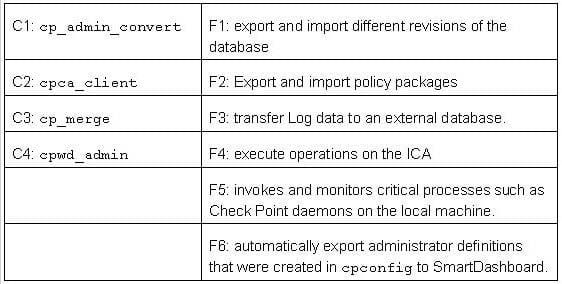
A. C1>F6; C2>F4; C3>F2; C4>F5
B. C1>F4; C2>F6; C3>F3; C4>F2
C. C1>F2; C2>F4; C3>F1; C4>F5
D. C1>F2; C2>F1; C3>F6; C4>F4
You are preparing computers for a new ClusterXL deployment. For your cluster, you plan to use three machines with the following configurations:Are these machines correctly configured for a ClusterXL deployment?
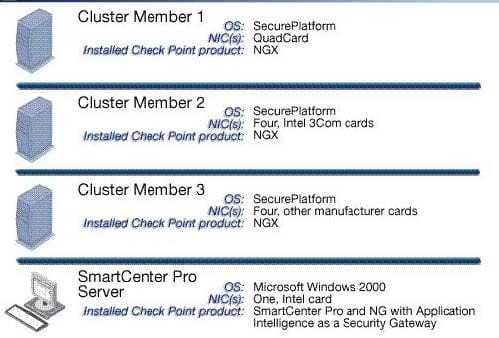
A. No, all machines in a cluster must be running on the same OS.
B. Yes, these machines are configured correctly for a ClusterXL deployment.
C. No, QuadCards are not supported with ClusterXL.
D. No, a cluster may only have two members.
The Check Point ClusterXL mode must synchronize the physical interface IP and MAC addresses on all clustered interfaces
A. New Mode HA
B. Legacy Mode HA
C. Multicast Mode Load Sharing
D. Pivot Mode Load Sharing
When launching SmartDashboard, what information is required to log into VPN-1 NGX R65?
A. User Name, Password, SmartCenter Server IP
B. User Name, SmartCenter Server IP, certificate fingerprint file
C. Password, SmartCenter Server IP. LDAP Server
D. Password, SmartCenter Server IP
You plan to migrate an NG with Application Intelligence (Al) R55 SmartCenter Server on Windows to VPN1 NGX R65. You also plan to upgrade four VPN-1 Pro Gateways at remote offices, and one local VPN-1 Pro Gateway at your company's headquarters. The SmartCenter Server configuration must be migrated. What is the correct procedure to migrate the configuration?
A. 1. Upgrade the five remote Gateways via SmartUpdate.
2. Upgrade the SmartCenter Server, using the NGX R65 CD.
B. 1. From the VPN-1 NGX R65 CD on the SmartCenter Server, select "Upgrade".
2.
Reboot after installation and upgrade all licenses via SmartUpdate.
3.
Reinstall all gateways using NGX R65 and install a policy.
C. 1. From the VPN-1 NGX R65 CD in the SmartCenter Server, select "Export".
2.
Install VPN-1 NGX R65 on a new PC using the option "Installation using imported configuration".
3.
Reboot after installation and upgrade all licenses via SmartUpdate.
4.
Upgrade software on all five remote Gateways via SmartUpdate.
D. 1. Copy the $FWDIR\conf directory from the SmartCenter Server.
2.
Save directory contents to another file server.
3.
Uninstall the SmartCenter Server, and install a new SmartCenter Server.
4.
Move the saved directory contents to $FWDIR\conf replacing the default installation files.
5.
Reinstall all gateways using VPN-1 NGX R65 and install a Security Policy.
When configuring VPN High Availability (HA) with MEP, which of the following is correct?
A. The decision on which MEP Security Gateway to use is made on the remote gateway's side (non-MEP side).
B. MEP Gateways must be managed by the same SmartCenter Server.
C. MEP VPN Gateways cannot be geographically separated machines.
D. If one Gateway fails, the synchronized connection fails over to another Gateway and the connection continues
What physical machine must have access to the User Center public IP when checking for new packages with SmartUpdate?
A. SmartUpdate installed SmartCenter Server PC
B. SmartUpdate GUI PC
C. VPN-1 Security Gateway getting the new upgrade package
D. SmartUpdate Repository SQL database Server
Where do you enable popup alerts for SmartDefense settings that have detected suspicious activity?
A. In SmartView Monitor, select Tools > Alerts
B. In SmartView Tracker, select Tools > Custom Commands
C. In SmartDashboard, edit the Gateway object, select SmartDefense > Alerts
D. In SmartDashboard, select Global Properties > Log and Alert > Alert Commands