
1Z0-1045-20 Online Practice Questions and Answers
You are configuring the WMS Cloud to have multiple facilities and, as an added measure of control, you
want to easily identity the facility by looking at the barcode printed on the outbound carton.
Identify two valid configurations that are available in the Sequence Counter UI that you can use for the
OBLPN. (Choose two.)
A. You can set up the count increment in Facility 1 to increase by 1, the count increment in Facility 2 to increment by 2, and so on.
B. You can set up the sequence counter OBLPN to "Append Facility Code to Prefix".
C. You can specify different counts for the different facilitates within the Sequence Counter.
D. You can configure the sequence length for this facility to be different from the other facilities.
E. You can specify the "Color Code" in the Sequence Counter.
What is the primary purpose of the Wave Template Search Screen?
A. to identify all outbound loads that have not completed picking yet
B. to determine how many picking tasks will be waved for picking
C. to determine which available orders will be waved for picking
D. to determine the locked locations for inventory allocation
E. to determine from which part of the warehouse the inventory will be allocated
What happens behind the flag Only deallocate on Short in the order type screen?
A. The Order Type has no impact on the Picking Process.
B. When the parameter is set to YES, during short pick, the system will put the order hold status until more inventory is available.
C. When the parameter is set to Yes, then only the shorted quantity will get deallocated form the order.
D. When the parameter is set to No, the shorted quantity on the order remains in the "allocated" status.
E. When the parameter is set to Yes, the short pick will cancel the shorted order line automatically and inventory adjustment will be generated for the item.
Your customer wants to Putaway LPN to Location by using the Putaway Rules and link the location with
the Replenishment Zone.
Which four configurations are required? (Choose four.)
A. Putaway Priority and Rules are set at Facility Level.
B. Set Replenishment Zone for Active Location.
C. Set the Location Size Type at Facility Level.
D. Putaway Type is set at Facility Level.
E. Set Replenishment Zone for Reserve Location.
F. Set Criteria for Putaway Rules.
Your client finds it easier to read reports without repeated values. The client shared an example report to demonstrate the way they want their columns to be displayed.
What action should you take to make your report look like the example report provided by client? Report A: A. Select the Hide Repeated Values icon.
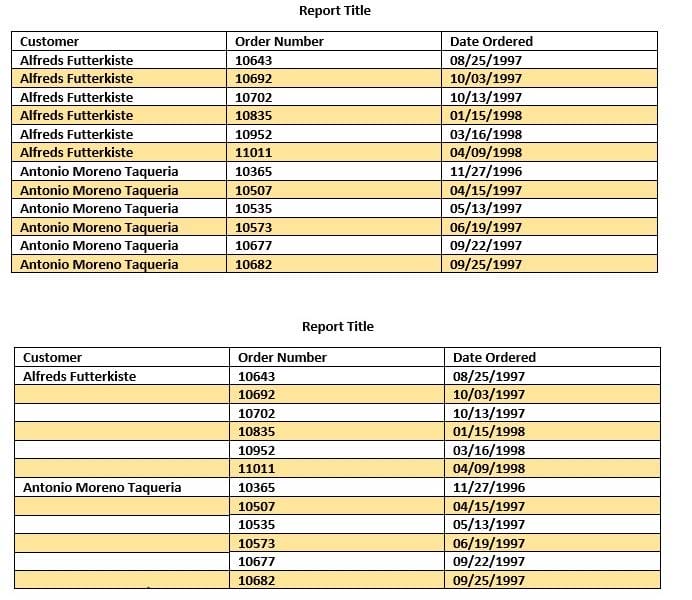
B. Select the Hid Common Values icon.
C. Select Chart Wizard, and delete repeated values.
D. Select the Suppress Duplicate Values icon.
In WMS Cloud, which two statements are true about WMS BI Cloud? (Choose two.)
A. WMS BI Cloud is available for use out of the box
B. WMS BI Cloud allows users to create reports by creating SQL queries
C. Tables in WMS BI Cloud are referred to as categories
D. By default, the WMS BI Cloud functionality is disabled
Select two configurations required to fulfill a Cross Dock order. (Choose two.)
A. The Replenishment template is required to replenish Cross Dock Order
B. Wave template should be configured to allocate Cross Dock Order
C. The Cross Dock Outbound Order type should be defined
D. IB Shipment Type should be defined for Cross Dock ASN
E. Module Parameter should be enabled on the RF Receive Screen for receiving Cross Dock ASN
What is true about emailing a scheduled report?
A. You cannot customize the subject of the email
B. You can email reports in HTML format
C. The person receiving the email must have an email registered with a username in the system
D. You can add an additional filter for a specific scheduled report
Your customer wants to allocate Default Putaway Type and Drop location for the Blind IB LPNs after
Putaway.
Select the three configurations required to complete Putaway process. (Choose three.)
A. Use Putaway Type defined in Putaway Type UI screen to set PUTAWAY_TYPE Parameter in Facility Parameter UI Screen
B. Putaway Type should be defined in Putaway Type UI screen at Facility level.
C. Set DEFAULT_DROP_LOCN Parameter in Company Parameter UI screen.
D. Use Putaway Type defined in Putaway Type UI screen to set PUTAWAY_TYPE Parameter in Company parameter UI Screen.
E. Set Putaway Priority and Rules in UI Screen at Facility level.
F. Set DEFAULT_DROP_LOCN Parameter in Facility Parameter UI screen.
You are the Inventory Control Supervisor at your employer's East Coast facility. Your employer is a 3PL,
and your customer is a large company that is also serviced out of the other 3PL facilities. As you start the
shift, your Inventory Control team members inform you of a significant change in the RF Cycle Counting
process.
Lost IBLPNs are now updates with a "00" lock code rather than the expected "LL" code.
Which scenario is causing this issue?
A. You dismiss the concern because a change in the lock code has no impact on either the WMS Cloud or host inventories.
B. Your counterpart at the 3PL's other facility changed one of the cycle counting company parameters and that impacted your workflow for that same company.
C. An inventory team member in the other facility marked a lost case with "00" lock code causing all subsequent lost cases to be defaulted to the same code across all LPNs for all company/facility combinations.
D. While counting LPNs at a location, one of your team members marked a lost case with the new lock code. The new lock code is stored in system memory and applied to all IBLPNs counted as "Lost".
E. One of your inventory team members changed his/her RF parameter default lock code causing the same configuration change to propagate to all users in the facility.