Exam2pass
0 items Sign In or Register
  • Home
  • IT Exams
  • Guarantee
  • FAQs
  • Reviews
  • Contact Us
  • Demo
Exam2pass > Cisco > CCNP Enterprise > 300-440 > 300-440 Online Practice Questions and Answers

300-440 Online Practice Questions and Answers

Questions 4

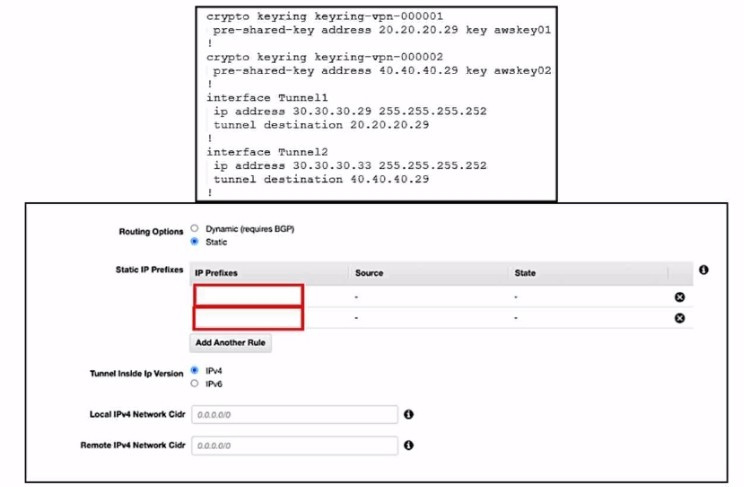
Refer to the exhibits.

An engineer needs to configure a site-to-site IPsec VPN connection between an on premises Cisco IOS XE router and Amazon Web Services (AWS). Which two IP prefixes should be used to configure the AWS routing options? (Choose two.)

A. 30.30.30.0/30

B. 20.20.20.0/24

C. 30.30.30.0/24

D. 50.50.50.0/30

E. 40.40.40.0/24

Buy Now

Correct Answer: AE

The correct answer is A and E because they are the IP prefixes that match the tunnel interfaces on the Cisco IOS XE router. The AWS routing options should include the local and remote IP prefixes that are used for the IPsec tunnel endpoints. The other options are either the public IP addresses of the routers or the LAN subnets that are not relevant for the IPsec tunnel configuration. References= Designing and Implementing Cloud Connectivity (ENCC) v1.0, Configure IOS-XE Site-to-Site VPN Connection to Amazon Web Services, Site-to-Site VPN with Amazon Web Services

Questions 5

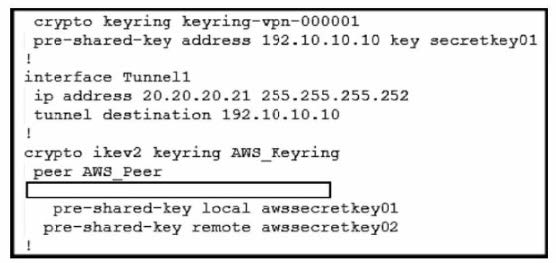
Refer to the exhibit.

An engineer needs to configure a site-to-site IPsec VPN connection between an on-premises Cisco IOS XE router and Amazon Web Services (AWS). Which configuration command must be placed in the blank in the code to complete the tunnel configuration?

A. address 20.20.20.21

B. address 192.10.10.10

C. tunnel source 20.20.20.21

D. tunnel source 192.10.10.10

Buy Now

Correct Answer: C

In the given scenario, an engineer is configuring a site-to-site IPsec VPN connection between an on-premises Cisco IOS XE router and AWS. The correct command to complete the tunnel configuration is "tunnel source 20.20.20.21". This command specifies the source IP address for the tunnel, which is essential for establishing a secure connection between two endpoints over the internet or another network.

References: Configure IOS-XE Site-to-Site VPN Connection to Amazon Web Services - Cisco Community [Security for VPNs with IPsec Configuration Guide, Cisco IOS XE Release 3S - Config

Questions 6

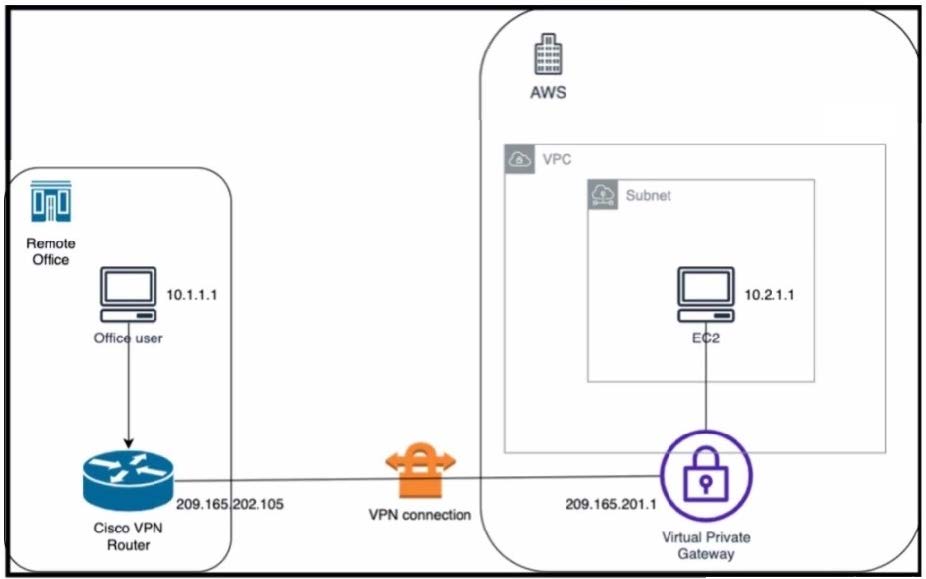
Refer to the exhibit.

An engineer successfully brings up the site-to-site VPN tunnel between the remote office and the AWS virtual private gateway, and the site-to-site routing works correctly. However, the end-to-end ping between the office user PC and the AWS EC2 instance is not working.

Which two actions diagnose the loss of connectivity? (Choose two.)

A. Check the network security group rules on the host VNET.

B. Check the security group rules for the host VPC.

C. Check the IPsec SA counters.

D. On the Cisco VPN router, configure the IPsec SA to allow ping packets.

E. On the AWS private virtual gateway, configure the IPsec SA to allow ping packets.

Buy Now

Correct Answer: BC

The end-to-end ping between the office user PC and the AWS EC2 instance is not working because either the security group rules for the host VPC are blocking the ICMP traffic or the IPsec SA counters are showing errors or drops. To

diagnose the loss of connectivity, the engineer should check both the security group rules and the IPsec SA counters. The network security group rules on the host VNET are not relevant because they apply to Azure, not AWS. The IPsec SA

configuration on the Cisco VPN router and the AWS private virtual gateway are not likely to be the cause of the problem because the site- to-site VPN tunnel is already up and the site-to-site routing works correctly.

References:

Designing and Implementing Cloud Connectivity (ENCC, Track 1 of 5), Module 3:

Configuring IPsec VPN from Cisco IOS XE to AWS, Lesson 3: Verify IPsec VPN Connectivity

Security for VPNs with IPsec Configuration Guide, Cisco IOS XE, Chapter: IPsec VPN Overview, Section: IPsec Security Association AWS Documentation, User Guide for AWS VPN, Section: Security Groups for Your VPC

Questions 7

An engineer must enable the OMP advertisement of BGP routes for a specific VRF instance on a Cisco IOS XE SD-WAN device. What should be configured after the global address-family ipv4 is configured?

A. Set the VRF-specific route advertisements.

B. Enable bgp advertisement.

C. Enter sdwan mode.

D. Disable bgp advertisement.

Buy Now

Correct Answer: B

To enable the OMP advertisement of BGP routes for a specific VRF instance on a Cisco IOS XE SD-WAN device, the engineer must first configure the global address-family ipv4 and then enable bgp advertisement under the vrf definition.

This will allow the device to advertise the BGP routes learned from the cloud provider to the OMP control plane, which will then distribute them to the other SD-WAN devices in the overlay network.

References:

Designing and Implementing Cloud Connectivity (ENCC) v1.0, Module 3:Implementing Cloud Connectivity, Lesson 3: Configuring IPsec VPN from Cisco IOS XE to AWS, Topic: Configuring BGP on the Cisco IOS XE Device, Page 3-24.

Questions 8

Which feature is unique to Cisco SD-WAN IPsec tunnels compared to native IPsec VPN tunnels?

A. real-time dynamic path selection

B. tunneling protocols

C. end-to-end encryption

D. authentication mechanisms

Buy Now

Correct Answer: A

Cisco SD-WAN IPsec tunnels are different from native IPsec VPN tunnels in several ways. One of the unique features of Cisco SD-WAN IPsec tunnels is that they support real-time dynamic path selection, which means that they can

automatically choose the best path for each application based on the network conditions and policies. This feature improves the performance, reliability, and efficiency of the network traffic. Native IPsec VPN tunnels, on the other hand, do not

have this capability and rely on static routing or manual configuration to select the path for each tunnel. This can result in suboptimal performance, increased latency, and higher costs.

References:

Traditional IPsec Versus Cisco SD-WAN IPsec, SD-WAN vs IPsec VPN's - What's the difference?, SD-WAN vs. VPN: How Do They Compare?, Traditional IPSEC Versus SD-WAN IPSEC

Questions 9

Refer to the exhibits.

An engineer must redistribute OSPF internal routes into BGP to connect an on-premises network to a cloud provider. Which two commands should the engineer run on router R2? (Choose two.)

A. router bgp 100

B. redistribute bgp 100

C. router ospf 1

D. redistribute ospf 1

E. redistribute ospf 100

Buy Now

Correct Answer: AD

Questions 10

DRAG DROP

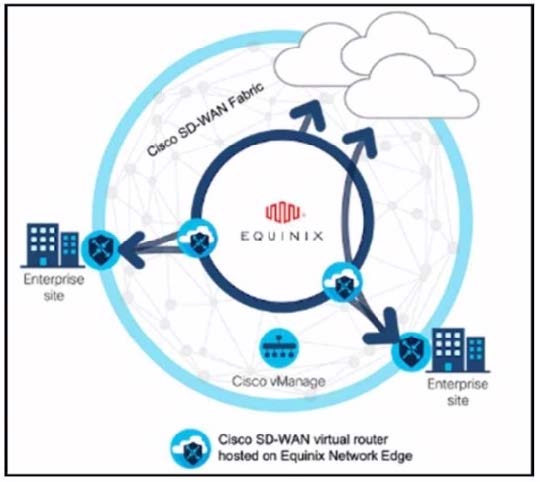
Refer to the exhibit.

These configurations are complete:

1.

Create an account in the Equinix portal.

2.

Associate the Equinix account with Cisco vManage.

3.

Configure the global settings for Interconnect Gateways.

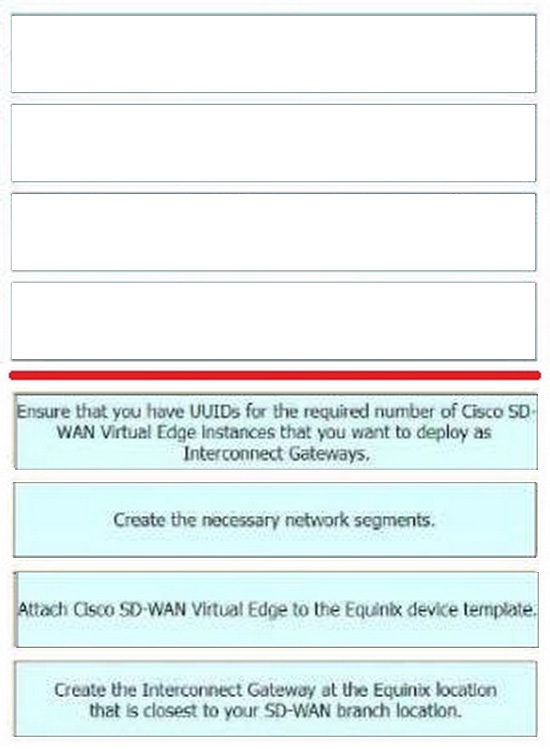
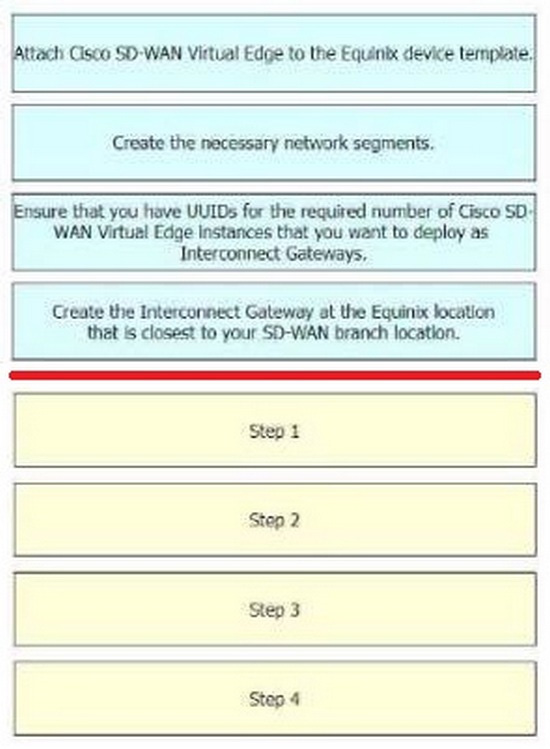
Drag the prerequisite steps from the left onto the order on the right to configure a Cisco SD-WAN Cloud Interconnect with Equinix

Select and Place:
Buy Now

Correct Answer:

The process of configuring a Cisco SD-WAN Cloud Interconnect with Equinix involves several steps.

Ensure that you have UUIDs for the required number of Cisco SD WAN Virtual Edge instances that you want to deploy as Interconnect Gateways: This is the first step where you ensure that you have the necessary UUIDs for the Cisco SDWAN Virtual Edge instances that you want to deploy.

Create the necessary network segments: After ensuring the availability of UUIDs, you create the necessary network segments.

Attach Cisco SD-WAN Virtual Edge to the Equinix device template: After setting up the network segments, you attach the Cisco SD-WAN Virtual Edge to the Equinix device template.

Create the Interconnect Gateway at the Equinix location that is closest to your SD- WAN branch location: Finally, you create the Interconnect Gateway at the Equinix location that is closest to your SD-WAN branch location.

References:

[Cisco SD-WAN Cloud Interconnect with Equinix]

[Cisco SD-WAN Cloud OnRamp for CoLocation Deployment Guide]

Questions 11

DRAG DROP

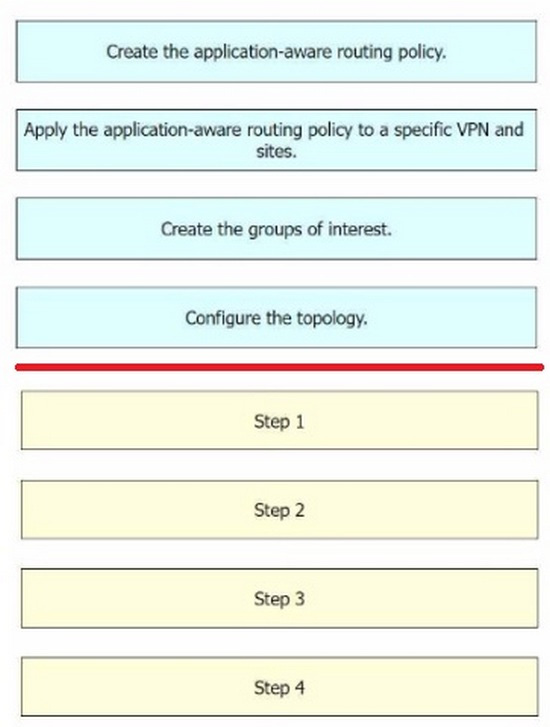
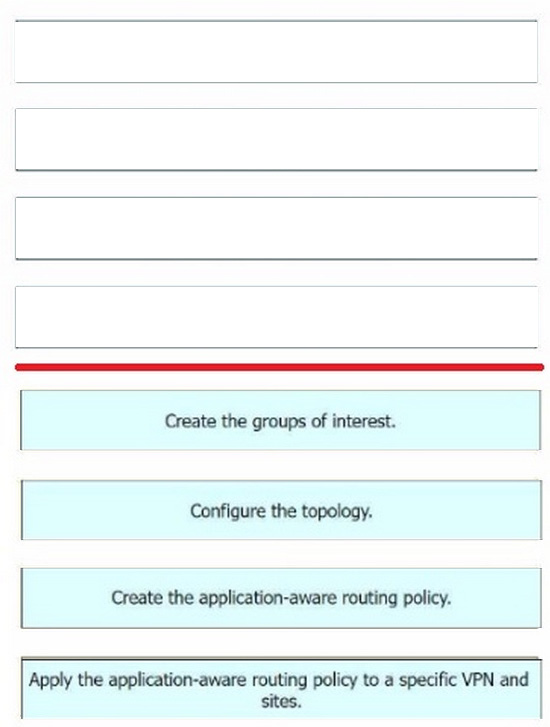
An engineer must use Cisco vManage to configure an application-aware routing policy Drag and drop the steps from the left onto the order on the right to complete the configuration.

Select and Place:
Buy Now

Correct Answer:

Step 1 = Create the groups of interest.

Step 2 = Configure the topology.

Step 3 = Create the application-aware routing policy.

Step 4 = Apply the application-aware routing policy to a specific VPN and sites.

The process of configuring an application-aware routing policy in Cisco vManage involves several steps.

Create the groups of interest: This is the first step where you define the applications or groups that the policy will affect. Configure the topology: This involves setting up the network topology that the policy will operate within.

Create the application-aware routing policy: After setting up the groups and topology, you then create the application-aware routing policy. This policy tracks network and path characteristics of the data plane tunnels between Cisco SD- WAN

devices and uses the collected information to compute optimal paths for data traffic.

Apply the application-aware routing policy to a specific VPN and sites: Finally, the created policy is applied to a specific VPN and sites. This allows the policy to affect the desired network traffic.

References:

Designing and Implementing Cloud Connectivity (ENCC) v1.0 Learning Plan: Designing and Implementing Cloud Connectivity v1.0 (ENCC 300- 440)

Information About Application-Aware Routing - Cisco Configuring Application-Aware Routing (AAR) Policies | NetworkAcademy.io Policies Configuration Guide, Cisco IOS XE SD-WAN Releases 16.11, 16.12

Questions 12

DRAG DROP

An engineer must configure a CLI add-on feature template in Cisco vManage for enhanced policy-based routing (ePBR) for IPv4. These configurations were deleted:

1.

licensing config enable false

2.

licensing config privacy hostname true

3.

licensing config privacy version false

4.

licensing config utility utility-enable true

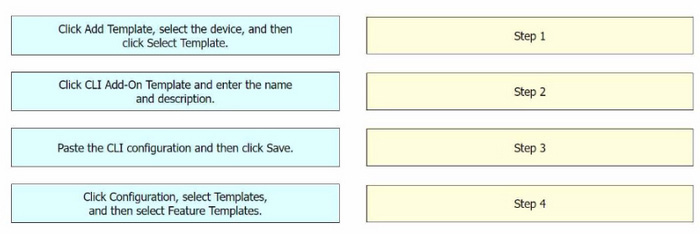
Drag and drop the steps from the left onto the order on the right to complete the configuration.

Select and Place:
Buy Now

Correct Answer:

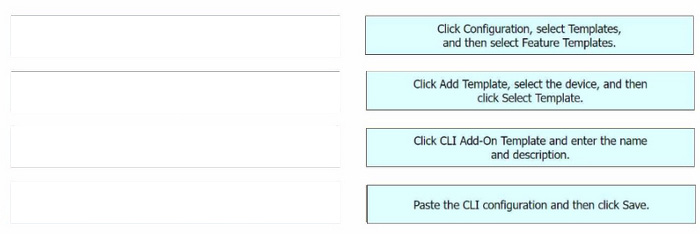
Step 1 = Click Configuration, select Templates, and then select Feature Templates.

Step 2 = Click Add Template, select the device, and then click Select Template.

Step 3 = Click CLI Add-On Template and enter the name and description.

Step 4 = Paste the CLI configuration and then click Save.

The process of configuring a CLI add-on feature template in Cisco vManage for enhanced policy-based routing (ePBR) for IPv4 involves several steps1234. Click Configuration, select Templates, and then select Feature Templates: This is the

first step where you navigate to the Templates section in the Configuration menu of Cisco vManage.

Click Add Template, select the device, and then click Select Template: In this step, you add a new template for the device.

Click CLI Add-On Template and enter the name and description: After setting up the template, you select the CLI Add-On Template option, and then enter the name and description for the template.

Paste the CLI configuration and then click Save: Finally, you paste the CLI configuration into the template and save the changes.

References:

CLI Add-On Feature Templates - Cisco

Cisco Catalyst SD-WAN Systems and Interfaces Configuration Guide, Cisco IOS XE Catalyst SD-WAN Release 17.x - CLI Add-On Feature Templates Cisco SD-WAN vSmart CLI Template - NetworkLessons.com CLI Templates for Cisco XE

SD-WAN Routers

Questions 13

DRAG DROP

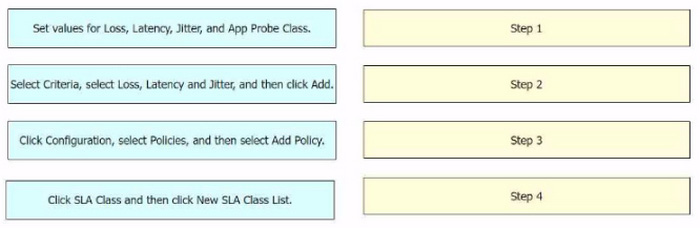
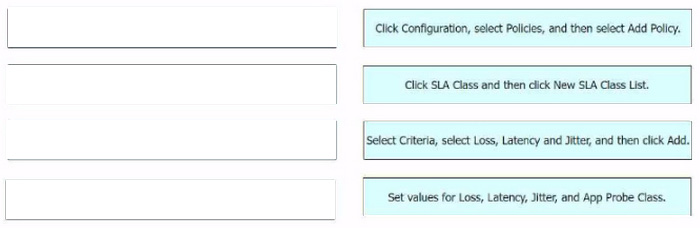
An engineer must use Cisco vManage to configure an SLA class to specify the maximum packet loss, packet latency, and jitter allowed on a connection. Drag and drop the steps from the left onto the order on the right to complete the configuration.

Select and Place:
Buy Now

Correct Answer:

The process of configuring an SLA class to specify the maximum packet loss, packet latency, and jitter allowed on a connection using Cisco vManage involves several steps. Click Configuration, select Policies, and then select Add Policy:

This is the first step where you navigate to the Policies section in the Configuration menu of Cisco vManage.

Click SLA Class and then click New SLA Class List: In this step, you create a new SLA Class List.

Select Criteria, select Loss, Latency and Jitter, and then click Add: After setting up the SLA Class List, you select the criteria for the SLA class. In this case, the criteria are Loss, Latency, and Jitter.

Set values for Loss, Latency, Jitter, and App Probe Class: Finally, you set the values for Loss, Latency, Jitter, and App Probe Class.

References:

Information About Application-Aware Routing - Cisco Policies Configuration Guide for vEdge Routers, Cisco SD-WAN Release

Exam Code: 300-440
Exam Name: Designing and Implementing Cloud Connectivity (ENCC)
Last Update: May 26, 2026
Questions: 38

PDF (Q&A)

$45.99
ADD TO CART

VCE

$49.99
ADD TO CART

PDF + VCE

$59.99
ADD TO CART

Exam2Pass----The Most Reliable Exam Preparation Assistance

There are tens of thousands of certification exam dumps provided on the internet. And how to choose the most reliable one among them is the first problem one certification candidate should face. Exam2Pass provide a shot cut to pass the exam and get the certification. If you need help on any questions or any Exam2Pass exam PDF and VCE simulators, customer support team is ready to help at any time when required.

Home | Guarantee & Policy |  Privacy & Policy |  Terms & Conditions |  How to buy |  FAQs |  About Us |  Contact Us |  Demo |  Reviews

2026 Copyright @ exam2pass.com All trademarks are the property of their respective vendors. We are not associated with any of them.