
9A0-096 Online Practice Questions and Answers
You will be shooting footag e on location against a green screen that will need to be keyed out in After Effects. Which set of actions will help After Effects create a clean key from the footage?
A. shoot compressed footage and then blur the footage before keying it in After Effects
B. shoot uncompressed footage and then blur the footage before keying it in After Effects
C. shoot compressed footage and then sharpen the footage before keying it in After Effects
D. shoot uncompressed footage and then sharpen the footage before keying it in After Effects
Click the Exhibit button.
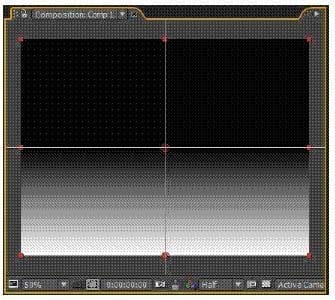
What should you do to view an effect's Control Origin Coordinates in the Composition panel?
A. select the effect and enter values for the X and Y coordinates of the Effect Control Point in the timeline
B. select the effect name in the Effect Controls panel, and click the Effect Control Point icon next to the coordinate you wish to view
C. select the effect name in the Timeline panel or in the Effect Controls panel, and view the Control Origin Coordinates in the Info panel
D. double-click the layer to open it in the Layer Viewer, and from the View pulldown menu, select the effect you wish to view the coordinates for
What are two reasons why a message would appear in the Info panel that states that After Effects is temporarily disabling Render Multiple Frames Simultaneously? (Choose two.)
A. The project settings are set to 32bpc.
B. The composition contains a live Photoshop 3D layer .
C. The Color Management option is set to On in the project settings.
D. The project is set to use OpenGL for rendering of previews or final output.
E. The composition is not using one of After Effects' built -in comp size presets.
What is the main use for the Caps Lock key in After Effects?
A. It suspends composition preview updates.
B. It displays layers in Wireframe Preview mode.
C. It turns off shadow and light previews when working with 3D layers.
D. It temporarily disables the render ing of all effects on all layers in the timeline.
Upon rendering a composition, you would like After Effects to automatically replace a source item in your project with the new render. What is the most efficient way to do this?
A. set the Post Action render to "Set Proxy" in the Output module and click OK, then press Render, once the render is complete, press the little square icon next to the composition in t he Project panel
B. set the Post Action render to "None" in the Output module, click OK, and press Render, once the render is complete, select the file you wish to replace in the Project panel and choose File > Replace Footage > File
C. set the Post-Render Action to "Import and Replace Footage" in the Output Module and click OK, then twirl down the Output Module in the Render Queue, and drag the pick whip to the item to be replaced in the Project panel to specify it, then press Render
D. set the Post-Render Action to "Import" in the Output Module, click OK, and press Render, once the render is complete, select the item you wish to replace in the timeline panel, and drag the new footage from the Project panel while holding down ALT or OPTION onto that layer in the timeline
You have imported a layered Photoshop file into your project as a single footage item with merged layers, placed it in a comp and duplicated it. Now you wish to make changes to only one instance of the footage in the composition by deleting one of the layers within it. What should you do?
A. select the footage item in the Project panel and choose File > Replace Footage > With Layered Comp
B. select the footage item in the Timeline panel, choose Layer > Convert To Layered Comp, and double-click the resulting nested comp
C. delete the file from the Project panel, re-import the file and select "Import as Composition", choose Open, then place it back in the timeline
D. delete the file from the Project panel, re-import the file and select "Import as Composition- Cropped Layers", choose Open, then place it back in the timeline
You have imported a video clip of unknown size and duration. With the clip highlighted in the Project panel, what should you do to create a composition that will automatically be the right size and duration?
A. File > Add Footage to Comp
B. Composition > New Composition
C. File > New Comp from Selection>
D. Composition > Add to Render Queue
You use Device Central to create After Effects compositions that match specific mobile phone models. An additional composition named Preview is also created. What is the main purpose of this Preview compositio n?
A. to test Flash compatibility
B. to mimic the physical appearance of the mobile phone
C. to test the screen size, color depth, and sound capabilities of each mobile phone model
D. to view your master composition in the context of several mobile devices at the same time
You wish to keyframe the Position and Rotation values of a Photoshop Live 3D file that you have imported into a project as a composition. Where are the Position and Rotation properties that can be keyframed located?
A. the Photoshop Live 3D layer
B. a Null layer in the composition
C. the Camera layer in the composition
D. expressions on the Photoshop Live 3D layer
You are unable to set a color profile for a selected footage item in the project window, because the menu is grayed out. What do you need to do to enable color management and assign profiles?
A. change the project Color Settings to 16 or 32bpc
B. enable Pixel Aspect Ratio Correction in the composition window
C. assign a Working Space to the project in the Project Settings dialog D. choose a preset based on video resolution in the Composition Settings dialog