
Exam2pass
0 items Sign In or Register
  • Home
  • IT Exams
  • Guarantee
  • FAQs
  • Reviews
  • Contact Us
  • Demo
Exam2pass > Atlassian > Atlassian Certifications > ACP-520 > ACP-520 Online Practice Questions and Answers

ACP-520 Online Practice Questions and Answers

Questions 4

Jira Software was just installed on the "ewok7a" cloud site.

How were groups configured for this product by default?
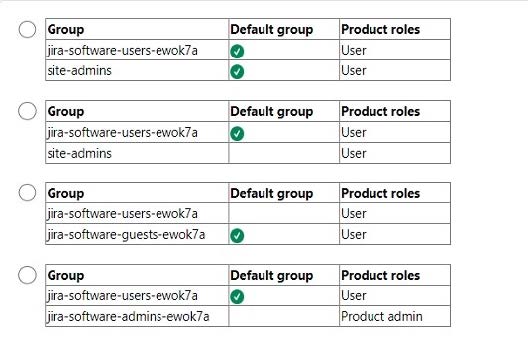
A. Option A

B. Option B

C. Option C

D. Option D

Buy Now

Correct Answer: A

By default, Jira Software creates two groups: jira-software-users and jira-software-admins. The jira-software-users group is granted the Jira Software User role, and the jira-software- admins group is granted the Jira Software Admin role. These roles determine the permissions and access that the group members have within Jira Software. The default groups also have a suffix that matches the site name, in this case "ewok7a". Therefore, the default groups for Jira Software on the "ewok7a" cloud site are jira-software-users-ewok7a and jira-software-admins-ewok7a, as shown in Option A12 References = Manage product access, Manage project roles

Questions 5

Foogie performed the following task.

He navigated to the Project Role Browser and set a default group in the Developers project role.

What admin privileges does Foogie definitely have?

A. Product admin role for Jira Administration

B. project admin role

C. site admin role

D. Product admin role for Confluence

E. org admin role

Buy Now

Correct Answer: C

To access the Project Role Browser and set a default group for a project role, Foogie must have the Administer Jira global permission, which is granted by the site admin role1. The product admin role for Jira Administration does not have this permission2. The project admin role can only manage project role members for specific projects, not the default members3. The product admin role for Confluence and the org admin role are irrelevant for this task. References: Manage project roles, Jira Cloud site and product administration, Project permissions

Questions 6

You went to the pricing page for one of the Cloud products and started a site with a Premium subscription trial to that product.

You used your work email address, "trainer@malamute.edu".

What was definitely created?

A. "site-admins" group

B. sandbox

C. Preview track

D. Jira Administration product

E. "malamute.edu" approved domain

Buy Now

Correct Answer: A

When you start a site with a Premium subscription trial to a Cloud product, you automatically create a "site-admins" group that contains your account as the only member. The "site-admins" group has the site admin role, which allows you to manage the site settings, products, users, and groups. You can also add other users to the "site-admins" group if you want to delegate some of the site administration tasks. References = Create and update groups and Manage site-level permissions

Questions 7

You want to delete a group that is currently used throughout Jira.

Where is the group definitely NOT used?

A. to search using the membersOf("") function

B. to limit who can make bulk updates

C. to restrict who can invite teammates to Jira

D. to hide workflow transitions

E. to secure the visibility of certain issues

Buy Now

Correct Answer: C

The statement that is true is that the group is definitely not used to restrict who can invite teammates to Jira. This is because inviting teammates to Jira is a site administration function that is controlled by the site admin role, not by any group. The other statements are false, as the group could be used for those purposes, depending on how the group is configured in the global permissions, the permission schemes, the issue security schemes, or the workflow conditions.

Questions 8

You are an org admin. Your organization contains the two users shown below.
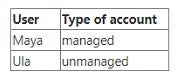
Which statement is true?

A. You can only delete Ula's account.

B. Both Maya and Ula can delete their accounts.

C. You can only delete Maya's account.

D. Only Maya can delete her account.

E. You can delete both accounts.

Buy Now

Correct Answer: E

As an organization admin, you can delete both managed and unmanaged accounts. Managed accounts are those that belong to your organization and are verified by a domain or an allowlist. Unmanaged accounts are those that do not belong to your organization and are not verified by a domain or an allowlist. Deleting an account removes the user's access to all Atlassian products and services, and deletes their personal data.

Questions 9

You just invited Omar to join your site and to Confluence only. But he reports that he can see Jira projects, as well.

Identify the root cause.

A. verified domains

B. managed accounts

C. groups

D. product roles

E. project roles

Buy Now

Correct Answer: C

The most likely root cause of Omar being able to see Jira projects is that he belongs to a group that has access to both Confluence and Jira products. Groups are used to manage users who need the same permissions or restrictions, and

they can be assigned to multiple products. When you invite a user to join your site and a product, you can also add them to a group that has access to that product. However, if the group also has access to other products, the user will be able

to see those products as well. To prevent this, you can either create a new group that only has access to Confluence, or remove the Jira access from the existing group that Omar is in.

References = [Manage groups] and [Give users access to products]

Questions 10

You need strict control over the number of active licenses for Jira Software. What can you do to gain stricter control?

A. Remove the default group from the Jira Software User product role.

B. Remove all groups from all Jira Software product roles.

C. Require admin approval for all approved domains.

D. Disable anonymous users in Jira and Confluence.

E. Remove the User product role itself for Jira Software.

Buy Now

Correct Answer: A

By removing the default group from the Jira Software User product role, you can prevent new users from automatically getting access to Jira Software when they join your site. This way, you can control who gets access to Jira Software and how many licenses are consumed. ReferencesManage product access Product roles and permissions

Questions 11

Your Cloud organization has multiple products on multiple sites.

Currently, Edmund is a brand new user with no product access.

You selected Edmund from Directory > Users, clicked "Add products", and set the User product role from the Product roles dropdown for a single product on

a single site. For all other products, the Product roles dropdown was None.

Which is NOT a possible outcome for Edmund?

A. He gains access to different products on multiple sites.

B. He is granted product admin privileges.

C. He gains access to the same product on multiple sites.

D. He gains access to a single product on a single site.

E. He gains access to multiple products on a single site.

F. He is granted org admin privileges.

Buy Now

Correct Answer: F

The only outcome that is not possible for Edmund is that he is granted org admin privileges. This is because org admin privileges are not related to product access or product roles, but to organization settings and management. To grant Edmund org admin privileges, you would need to go to Settings > Organization admins and add him there. The other outcomes are possible depending on the product access settings and the groups that Edmund belongs to. References = [Give users access to products] and [Manage organization admins]

Questions 12

Your Cloud organization has the following:

. 2 production instances of Jira Software

. 2 production instances of Confluence

What else does your organization definitely have?

A. at least 2 sites

B. at least 1 verified domain

C. exactly 4 landing products

D. at least 1 Premium subscription plan

E. at least 2 sandboxes

Buy Now

Correct Answer: A

An Atlassian Cloud organization can have one or more sites, each containing one instance of each product1. A site has its own URL and administration settings2. Since your organization has two instances of Jira Software and two instances of Confluence, it must have at least two sites to host them. For example, one site could have the URL acme.atlassian.net and contain Jira Software and Confluence, while another site could have the URL acme-dev.atlassian.net and contain another instance of Jira Software and Confluence. The other options are not necessarily true for your organization. Having multiple sites does not imply that you have verified your domain, which is a process that allows you to manage the Atlassian accounts of your users and apply security policies to them3. You may or may not have verified your domain, depending on whether you have access to your domain's DNS or HTTPS settings. Verifying your domain is not required to use Atlassian cloud products. A landing product is the product that your users see first when they log in to your site4. You can only set the landing product to Jira or Confluence. Therefore, you cannot have exactly four landing products, as you can only have one landing product per site. You may have two landing products if you set one for each site, or you may have none if you do not set any. A Premium subscription plan is a plan that offers advanced features, unlimited storage, 99.9% uptime SLA, and 24/7 Premium support for Jira Software, Confluence, Jira Service Management, and Jira Work Management5. You may or may not have a Premium subscription plan for your products, depending on your needs and budget. Having multiple sites or products does not automatically mean that you have a Premium subscription plan. A sandbox is an isolated environment where you can test and experiment before making changes to production6. A sandbox is available for Jira Software, Jira Service Management, and Confluence with Premium and Enterprise plans6. You may or may not have sandboxes for your products, depending on whether you have a Premium or Enterpriseplan and whether you have created a sandbox from your organization. Having multiple sites or products does not automatically mean that you have sandboxes. References : Understand Atlassian sites and organizations What is an Atlassian organization? Verify a domain to manage accounts Set your site's landing product Atlassian Cloud Premium Manage product sandboxes

Questions 13

You are viewing a list of names under Directory > Users.

The status for Rolf shows as "Active".

Which statement is definitely true?

A. Rolf belongs to at least one group.

B. Rolf's access has not been suspended.

C. Rolf has a managed account.

D. Rolf accessed your site within the past 24 hours.

E. Rolf has access to at least one product.

Buy Now

Correct Answer: B

The status "Active" means that the user has an active account and can access the products they have been granted access to1. It does not imply anything about the user's group membership, account type, last login time, or product access.

References:

Manage users in your organization

Exam Code: ACP-520
Exam Name: Atlassian Cloud Organization Admin
Last Update: Jul 04, 2026
Questions: 65

PDF (Q&A)

$45.99
ADD TO CART

VCE

$49.99
ADD TO CART

PDF + VCE

$59.99
ADD TO CART

Exam2Pass----The Most Reliable Exam Preparation Assistance

There are tens of thousands of certification exam dumps provided on the internet. And how to choose the most reliable one among them is the first problem one certification candidate should face. Exam2Pass provide a shot cut to pass the exam and get the certification. If you need help on any questions or any Exam2Pass exam PDF and VCE simulators, customer support team is ready to help at any time when required.

Home | Guarantee & Policy |  Privacy & Policy |  Terms & Conditions |  How to buy |  FAQs |  About Us |  Contact Us |  Demo |  Reviews

2026 Copyright @ exam2pass.com All trademarks are the property of their respective vendors. We are not associated with any of them.