Exam2pass
0 items Sign In or Register
  • Home
  • IT Exams
  • Guarantee
  • FAQs
  • Reviews
  • Contact Us
  • Demo
Exam2pass > Microsoft > Microsoft Certifications > AZ-120 > AZ-120 Online Practice Questions and Answers

AZ-120 Online Practice Questions and Answers

Questions 4

Your company has an SAP environment that contains the following components:

SAP systems based on SAP HANA and SAP Adaptive Server Enterprise (SAP ASE) that run on SUSE Linux Enterprise Server 12 (SLES 12)

Multiple SAP applications

The company plans to migrate all the applications to Azure.

You need to get a comprehensive list of all the applications that are part of the SAP environment.

What should you use?

A. the SAP license information

B. the SAP Solution Manager

C. the data volume management report

D. the network inventory and locations

Buy Now

Correct Answer: B

The SAP Solution Manager is a centralized robust application management and administration solution used to implement, support, operate and monitor your SAP enterprise solutions, SAP Solution Manager is a platform providing integrated content, tools, methodologies and access to SAP systems.

Incorrect Answers:

C: Data volume management is a framework that helps the solution operations team of an SAP-centric solution to balance the need of business' access to a wealth of data and IT efforts to monitor and control data growth and to minimize data volume.

References: https://blogs.sap.com/2009/02/20/sap-solution-manager-overview-for-dummies/

Questions 5

You plan to deploy an SAP environment on Azure that will use Azure Availability Zones. Which load balancing solution supports the deployment?

A. Azure Basic Load Balancer

B. Azure Standard Load Balancer

C. Azure Application Gateway v1 SKU

Buy Now

Correct Answer: B

When you deploy Azure VMs across Availability Zones and establish failover solutions within the same Azure region, some restrictions apply:

You can't use an Azure Basic Load Balancer to create failover cluster solutions based on Windows Server Failover Clustering or Linux Pacemaker. Instead, you need to use the Azure Standard Load Balancer SKU.

References:

https://docs.microsoft.com/en-us/azure/virtual-machines/workloads/sap/sap-ha-availability-zones

Questions 6

This question requires that you evaluate the underlined text to determine if it is correct.

You have an SAP environment on Azure that uses Microsoft SQL server as the RDBMS.

You plan to migrate to an SAP HANA database.

To calculate the amount of memory and disk space required for the database, you can use SAP Quick Sizer.

Instructions: Review the underlined text, If the makes the stamen correct, select `'No change is needed." if the statement is incorrect select the answer choice that makes the statement correct.

A. No change is needed.

B. Azure Migrate

C. /SDF/HDB_SIZING

D. SQL Server Management Studio (SSMS)

Buy Now

Correct Answer: C

If you want to move an existing deployed system from another relational database management system (RDBMS) to HANA. SAP provides reports to run on your existing SAP system. If the database is moved to HANA, these reports check

the data and calculate memory requirements for the HANA instance.

/SDF/HDB_SIZING is a standard Executable ABAP Report available within your SAP system (depending on your version and release level).

ABAP code listing snippet for SAP ABAP Report /SDF/HDB_SIZING *and-------------------------------*

*and Report /SDF/HDB_SIZING // ZNEWHDB_SIZE

*and

*and-------------------------------*

*and Estimates the memory requirement in HANA of non-HANA databases * *and When run on HANA, size the database using real memory consumption *and values.

*and-------------------------------*

*

*

REPORT /SDF/HDB_SIZING LINE-SIZE 101 LINE-COUNT 90 NO STANDARD PAGE HEADING.

DATA: l_version TYPE c LENGTH 6 VALUE '54'. "54.2 TYPES: ty_para(2) TYPE n,

ty_top(3) TYPE n.

TYPE-POOLS: abap.

DATA: tabname TYPE tabname,

subrc TYPE sy-subrc,

p_prf TYPE abap_bool,

See full code listing within your SAP system using transactions such as SE80 and SE38

Reference:

https://www.se80.co.uk/sapreports/-/-fs-/-fs-sdf-fs-hdb_sizing.htm

https://docs.microsoft.com/en-us/azure/virtual-machines/workloads/sap/hana-sizing

Questions 7

You have an existing SAP production landscape on Azure. The SAP application virtual machines have static IP addresses.

You need to replicate the virtual machines to another Azure region by using Azure Site Recovery. The source and target subnets have different address ranges. Which three actions should you perform? Each correct answer presents part of

the solution.

NOTE: Each correct selection is worth one point.

A. Stop the virtual machines.

B. Create a backup policy.

C. Create a recovery plan.

D. Modify the networking configuration.

E. Replicate the virtual machines.

Buy Now

Correct Answer: ACE

Questions 8

HOTSPOT

You have the following Azure Resource Manager template.
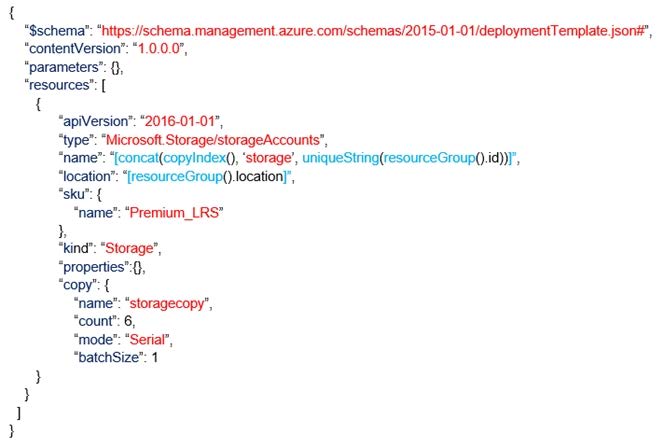
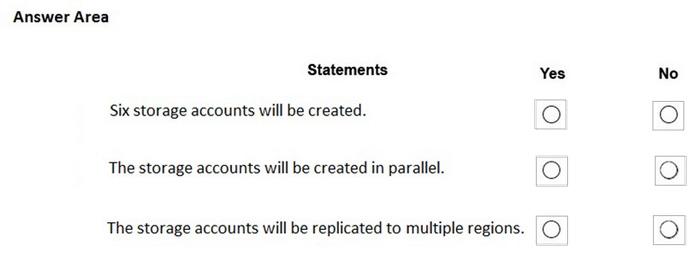
For each of the following statements, select Yes if the statement is true. Otherwise, select No.

NOTE: Each correct selection is worth one point.

Hot Area:
Buy Now

Correct Answer:

Box 1: Yes Count is 6.

Box 2: No Mode is serial.

Box 3: NO

References: https://docs.microsoft.com/en-us/azure/azure-resource-manager/templates/copy-resources

Questions 9

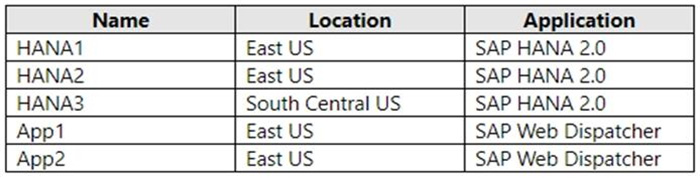
HOTSPOT

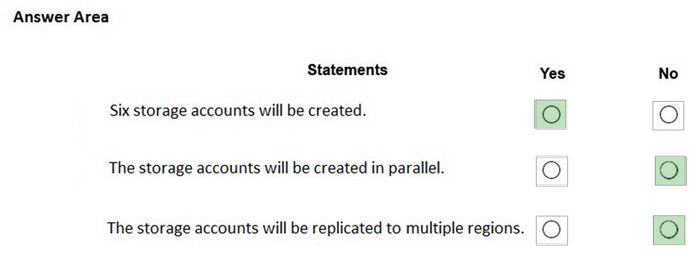
For each of the following statements, select Yes if the statement is true. Otherwise, select No.

NOTE: Each correct selection is worth one point.

Hot Area:
Buy Now

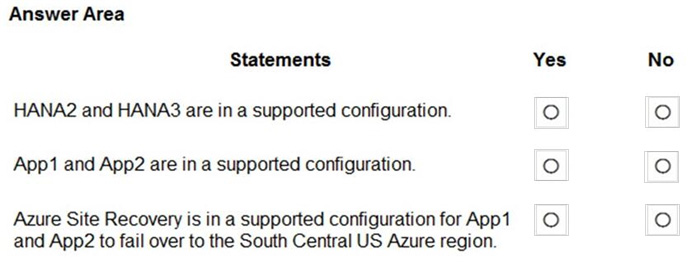
Correct Answer:

Box 1: No

Box 2: Yes The minimum SAP HANA certified conditions for the different storage types are: Azure Premium SSD - /hana/log is required to be cached with Azure Write Accelerator. The /hana/data volume could be placed on Premium SSD without Azure Write Accelerator or on Ultra disk Box 3: Yes References:

https://docs.microsoft.com/en-us/azure/virtual-machines/workloads/sap/hana-vm-operations-storage

Questions 10

HOTSPOT

You have an SAP production landscape on Azure that contains the virtual machines shown in the following table.

You configure HANA system replication as shown in the following table.

You configure two load balancers as shown in the following table.

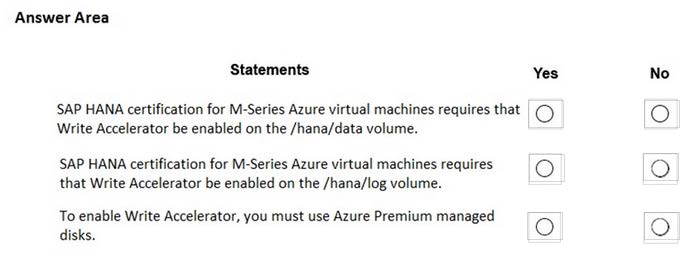
For each of the following statements, select Yes if the statement is true. Otherwise, select No. NOTE: Each correct selection is worth one point.

Hot Area:
Buy Now

Correct Answer:

Questions 11

HOTSPOT

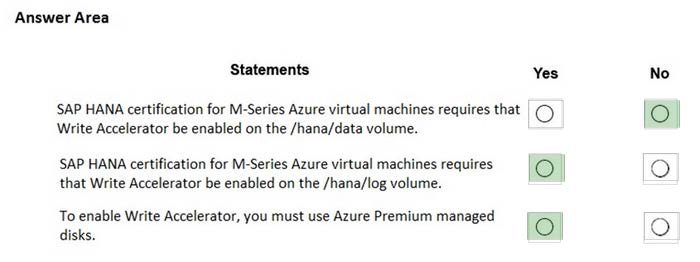
You plan to deploy an SAP NetWeaver landscape that will use SQL Server on Azure virtual machines. The database tier must meet the following requirement ?Maintain database availability in the event of a single Azure datacenter failure.

Maximize IOPS

How should you configure the database tier? To answer, select the appropriate options in the answer area.

NOTE Each correct selection is worth one point.

Hot Area:
Buy Now

Correct Answer:

Questions 12

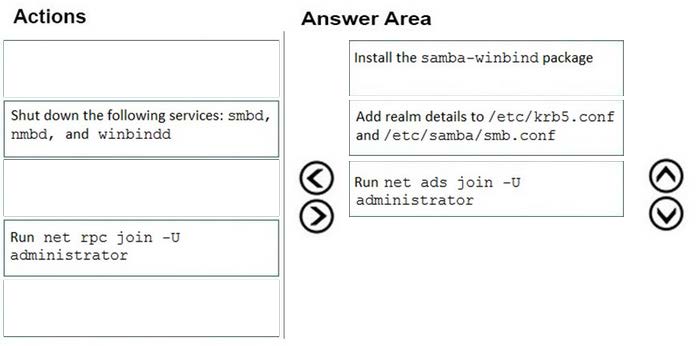
DRAG DROP

Your on-premises network contains an Active Directory domain.

You have an SAP environment on Azure that runs on SUSE Linux Enterprise Server (SLES) servers.

You configure the SLES servers to use domain controllers as their NTP servers and their DNS servers.

You need to join the SLES servers to the Active Directory domain.

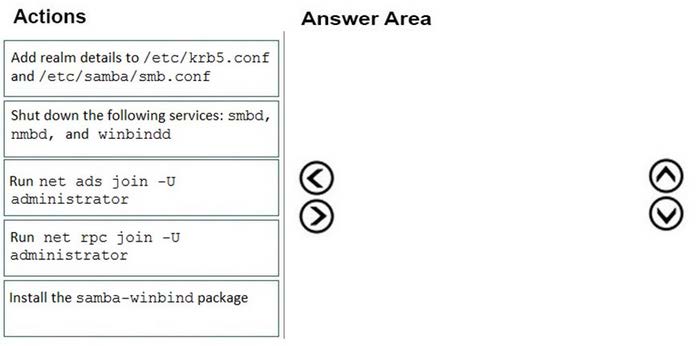
Which three actions should you perform in sequence? To answer, move the appropriate actions from the list of actions to the answer area and arrange them in the correct order.

Select and Place:
Buy Now

Correct Answer:

Step 1: Install the samba-winbind package Install samba-winbind

Step 2: Add realm details to /etc/krb5.conf and /etc/samba/smb.conf Edit files - best way to do this is to use yast on test machine and copy files from it In following examples you need to replace EXAMPLE/EXAMPLE.COM/.example.com with your values/settings /etc/samba/smb.conf [global]

workgroup = EXAMPLE

usershare allow guests = NO #disallow guests from sharing

idmap gid = 10000-20000

idmap uid = 10000-20000

kerberos method = secrets and keytab

realm = EXAMPLE.COM

security = ADS

template homedir = /home/%D/%U

template shell = /bin/bash

winbind offline logon = yes

winbind refresh tickets = yes

/etc/krb5.conf

[libdefaults]

default_realm = EXAMPLE.COM

clockskew = 300 [realms]

EXAMPLE.COM = {

kdc = PDC.EXAMPLE.COM

default_domain = EXAMPLE.COM

admin_server = PDC.EXAMPLE.COM

} ..

Step 3: Run net ads join -U administrator Join the SLES 12 Server to the AD domain

References: https://www.suse.com/support/kb/doc/?id=7018461

Questions 13

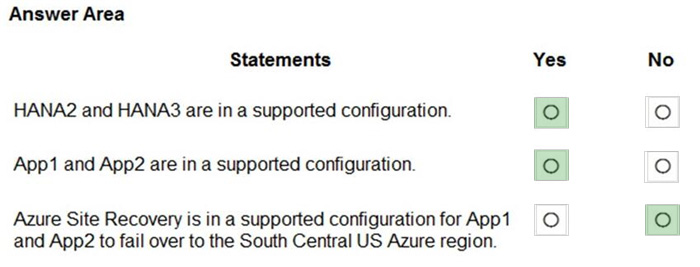
DRAG DROP

You have an Azure Active Directory (Azure AD) tenant and an SAP Cloud Platform Identity Authentication Service tenant.

You need to ensure that users can use their Azure AD credentials to authenticate to SAP applications and services that trust the SAP Cloud Platform Identity Authentication Service tenant.

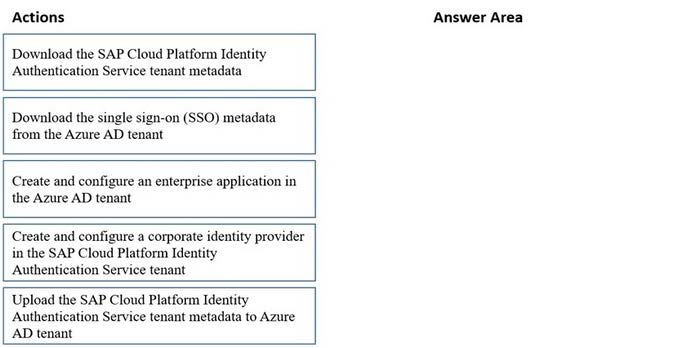
In which order should you perform the actions? To answer, move all actions from the list of actions to the answer area and arrange them in the correct order.

Select and Place:
Buy Now

Correct Answer:

Step 1: Create and configure an enterprise application in the Azure AD tentant

To configure the integration of SAP Cloud Platform Identity Authentication into Azure AD, you need to add SAP Cloud Platform Identity Authentication from the gallery to your list of managed SaaS apps.

Sign in to the Azure portal using either a work or school account, or a personal Microsoft account.

On the left navigation pane, select the Azure Active Directory service.

Navigate to Enterprise Applications and then select All Applications.

To add new application, select New application.

In the Add from the gallery section, type SAP Cloud Platform Identity Authentication in the search box.

Select SAP Cloud Platform Identity Authentication from results panel and then add the app. Wait a few seconds while the app is added to your tenant.

Step 2: Download the single sign-on (SSO) metadata from the Azure AD tenant.

Download single sign-on metadata from Azure Active Directory.

Step 3: Create and configure a corporate identity provider.

Create corporate identity provider.

Step 4: Download the SAP Cloud Platform Identity Authentication Service tenant metadata.

Download Identity Authentication service tenant metadata.

Step 5: Upload the SAP Cloud Platform Identity Authentication Service tenant metadata to Azure AD tenant.

Upload Identity Authentication service tenant metadata to Azure Active Directory.

You have already uploaded the metadata file from Azure Active Directory to Identity Authentication service. It's time to do it the other way round now and upload the metadata of Identity Authentication service to Azure Active Directory.

Reference:

https://developers.sap.com/tutorials/cp-ias-azure-ad.html

Exam Code: AZ-120
Exam Name: Planning and Administering Microsoft Azure for SAP Workloads
Last Update: May 27, 2026
Questions: 285

PDF (Q&A)

$45.99
ADD TO CART

VCE

$49.99
ADD TO CART

PDF + VCE

$59.99
ADD TO CART

Exam2Pass----The Most Reliable Exam Preparation Assistance

There are tens of thousands of certification exam dumps provided on the internet. And how to choose the most reliable one among them is the first problem one certification candidate should face. Exam2Pass provide a shot cut to pass the exam and get the certification. If you need help on any questions or any Exam2Pass exam PDF and VCE simulators, customer support team is ready to help at any time when required.

Home | Guarantee & Policy |  Privacy & Policy |  Terms & Conditions |  How to buy |  FAQs |  About Us |  Contact Us |  Demo |  Reviews

2026 Copyright @ exam2pass.com All trademarks are the property of their respective vendors. We are not associated with any of them.