Exam2pass
0 items Sign In or Register
  • Home
  • IT Exams
  • Guarantee
  • FAQs
  • Reviews
  • Contact Us
  • Demo
Exam2pass > Cisco > Cisco Certifications > CCST-NETWORKING > CCST-NETWORKING Online Practice Questions and Answers

CCST-NETWORKING Online Practice Questions and Answers

Questions 4

A host is given the IP address 172.16.100.25 and the subnet mask 255.255.252.0.

What is the CIDR notation for this address?

A. 172.16.100.25 /23

B. 172.16.100.25 /20

C. 172.16.100.25 /21

D. 172.16.100.25 /22

Buy Now

Correct Answer: D

The CIDR (Classless Inter-Domain Routing) notation for the subnet mask 255.255.252.0 is /22. This notation indicates that the first 22 bits of the IP address are used for network identification, and the remaining bits are used for host

addresses within the network1.

References:

Subnet Cheat Sheet ?24 Subnet Mask, 30, 26, 27, 29, and other IP Address CIDR Network References

=========================

Subnet Mask to CIDR Notation: The given subnet mask is 255.255.252.0. To convert this to CIDR notation:

Convert the subnet mask to binary: 11111111.11111111.11111100.00000000

Count the number of consecutive 1s in the binary form: There are 22 ones.

Therefore, the CIDR notation is /22.

References:

Understanding Subnetting and CIDR: Cisco CIDR Guide

Questions 5

What is the most compressed valid format of the IPv6 address 2001 :0db8:0000:0016:0000:001b: 2000:0056?

A. 2001:db8: : 16: : 1b:2:56

B. 2001:db8: : 16: : 1b: 2000: 56

C. 2001:db8: 16: :1b:2:56

D. 2001:db8: 0:16: :1b: 2000:56

Buy Now

Correct Answer: D

IPv6 addresses can be compressed by removing leading zeros and replacing consecutive groups of zeros with a double colon (::). Here's how to compress the address 2001:0db8:0000:0016:0000:001b:2000:0056:

Remove leading zeros from each segment:

Replace the longest sequence of consecutive zeros with a double colon (::). In this case, the two consecutive zeros between the 16 and 1b:

Thus, the most compressed valid format of the IPv6 address is 2001:db8:0:16::1b:2000:56.

References:

Cisco Learning Network

IPv6 Addressing (Cisco)

Questions 6

A local company requires two networks in two new buildings. The addresses used in these networksmust be in the private network range.

Which two address ranges should the company use? (Choose 2.)

Note: You will receive partial credit for each correct selection.

A. 172.16.0.0 to 172.31.255.255

B. 192.16.0.0 to 192.16.255.255

C. 11.0.0.0 to 11.255.255.255

D. 192.168.0.0 to 192.168.255.255

Buy Now

Correct Answer: AD

The private IP address ranges that are set aside specifically for use within private networks and not routable on the internet are as follows: Class A: 10.0.0.0 to 10.255.255.255 Class B: 172.16.0.0 to 172.31.255.255 Class C: 192.168.0.0 to 192.168.255.255 These ranges are defined by the Internet Assigned Numbers Authority (IANA) and are used for local communications within a private network123. Given the options: A.172.16.0.0 to 172.31.255.255falls within the Class B private range. B.

192.16.0.0 to 192.16.255.255is not a recognized private IP range. C.11.0.0.0 to 11.255.255.255is not a recognized private IP range. D.192.168.0.0 to 192.168.255.255 falls within the Class C private range.

Therefore, the correct selections that the company should use for their private networks are AandD.

References:

Reserved IP addresses on Wikipedia

Private IP Addresses in Networking - GeeksforGeeks Understanding Private IP Ranges, Uses, Benefits, and Warnings

Questions 7

An engineer configured a new VLAN named VLAN2 for the Data Center team. When the teamtries to ping addresses outside VLAN2 from a computer in VLAN2, they are unable to reach them.

What should the engineer configure?

A. Additional VLAN

B. Default route

C. Default gateway

D. Static route

Buy Now

Correct Answer: C

When devices within a VLAN are unable to reach addresses outside their VLAN, it typically indicates that they do not have a configured path to external networks. The engineer should configure a default gateway for VLAN2. The default gateway is the IP address of the router's interface that is connected to the VLAN, which will route traffic from the VLAN to other networks12.

References := -Understanding and Configuring VLAN Routing and Bridging on a Router Using the IRB Feature -VLAN 2 not able to ping gateway - Cisco Community ========================= -VLANs: Virtual Local Area Networks (VLANs) logically segment network traffic to improve security and performance. Devices within the same VLAN can communicate directly. -Default Gateway: For devices in VLAN2 to communicate with devices outside their VLAN, they need a default gateway configured. The default gateway is typically a router or Layer 3 switch that routes traffic between different VLANs and subnets. -Additional VLAN: Not needed in this scenario as the issue is related to routing traffic outside VLAN2, not creating another VLAN. -Default Route: While a default route on the router may be necessary, the primary issue for devices within VLAN2 is to have a configured default gateway. -Static Route: This is used on routers to manually specify routes to specific networks but does not address the need for a default gateway on the client devices.

References: -Cisco VLAN Configuration Guide: Cisco VLAN Configuration -Understanding and Configuring VLANs: VLANs Guide

Questions 8

A user initiates a trouble ticket stating that an external web page is not loading. You determine that other resources both internal and external are still reachable.

Which command can you use to help locate where the issue is in the network path to the external web page?

A. ping -t

B. tracert

C. ipconfig/all

D. nslookup

Buy Now

Correct Answer: B

The tracert command is used to determine the route taken by packets across an IP network. When a user reports that an external web page is not loading, while other resources are accessible, it suggests there might be an issue at a certain

point in the network path to the specific web page. The tracert command helps to diagnose where the breakdown occurs by displaying a list of routers that the packets pass through on their way to the destination. It can identify the network

segment where the packets stop progressing,

which is valuable for pinpointing where the connectivity issue lies. References := Cisco

CCST Networking Certification FAQs ?CISCONET Training Solutions, Command Prompt (CMD): 10 network-related commands you should know, Network Troubleshooting Commands Guide: Windows, Macand; Linux - Comparitech, How to

Use the Traceroute and Ping Commands to Troubleshoot Network, Network Troubleshooting Techniques: Ping, Traceroute, PathPing. -tracert Command: This command is used to determine the path packets take to reach a destination. It lists

all the hops (routers) along the way and can help identify where the delay or failure occurs. -ping -t: This command sends continuous ping requests and is useful for determining if a host is reachable but does not provide path information. ipconfig /all: This command displays all current TCP/IP network configuration values and can be used to verify network settings but not to trace a network path.

-nslookup: This command queries the DNS to obtain domain name or IP address mapping,

useful for DNS issues but not for tracing network paths.

References:

-Microsoft tracert Command: tracert Command Guide

-Troubleshooting Network Issues with tracert: Network Troubleshooting Guide

Questions 9

Which information is included in the header of a UDP segment?

A. IP addresses

B. Sequence numbers

C. Port numbers

D. MAC addresses

Buy Now

Correct Answer: C

The header of a UDP (User Datagram Protocol) segment includesport numbers. Specifically, it contains the source port number and the destination port number, which are used to identify the sending and receiving applications. UDP headers do not include IP addresses or MAC addresses, as those are part of the IP and Ethernet frame headers, respectively.Additionally, UDP does not use sequence numbers, which are a feature of TCP (Transmission Control Protocol) for ensuring reliable delivery of data segments1. References: Segmentation Explained with TCP and UDP Header User Datagram Protocol (UDP) - GeeksforGeeks Which three fields are used in a UDP segment header ========================= UDP Header: The header of a UDP segment includes the following key fields: IP Addresses: These are included in the IP header, not the UDP header. Sequence Numbers: These are part of the TCP header, not UDP. MAC Addresses: These are part of the Ethernet frame header and are not included in the UDP header. References: RFC 768 - User Datagram Protocol: RFC 768 Cisco Guide on UDP: Cisco UDP Guide

Questions 10

Which wireless security option uses a pre-shared key to authenticate clients?

A. WPA2-Personal

B. 802.1x

C. 802.1q

D. WPA2-Enterprise

Buy Now

Correct Answer: A

WPA2-Personal, also known as WPA2-PSK (Pre-Shared Key), is the wireless security option that uses a pre-shared key to authenticate clients. This method is designed for home and small office networks and doesn't require an

authentication server. Instead, every user on the network uses the same key or passphrase to connect.

References:

-What is a Wi-Fi Protected Access Pre-Shared Key (WPA-PSK)?

-Exploring WPA-PSK and WiFi Security

=========================

-WPA2-Personal: This wireless security option uses a pre-shared key (PSK) for authentication. Each client that connects to the network must use this key to gain access. It is designed for home and small office networks where simplicity and

ease of use are important.

-WPA2-Enterprise: Unlike WPA2-Personal, WPA2-Enterprise uses 802.1x authentication with an authentication server (such as RADIUS) and does not rely on a pre-shared key. -802.1x: This is a network access control protocol for LANs,

particularly wireless LANs. It provides an authentication mechanism to devices wishing to attach to a LAN or WLAN. -802.1q: This is a networking standard that supports VLAN tagging on Ethernet networks and is not related to wireless

security.

References:

Cisco Documentation on WPA2 Security: Cisco WPA2 Understanding Wireless Security: Wireless Security Guide

Questions 11

Which device protects the network by permitting or denying traffic based on IP address, port number, or application?

A. Firewall

B. Access point

C. VPN gateway

D. Intrusion detection system

Buy Now

Correct Answer: A

Firewall: A firewall is a network security device that monitors and controls incoming and outgoing network traffic based on predetermined security rules. It permits or denies traffic based on IP addresses, port numbers, or applications. Access Point: This is a device that allows wireless devices to connect to a wired network using Wi-Fi. It does not perform traffic filtering based on IP, port, or application. VPN Gateway: This device allows for secure connections between networks over the internet, but it is not primarily used for traffic filtering based on IP, port, or application. Intrusion Detection System (IDS): This device monitors network traffic for suspicious activity and policy violations, but it does not actively permit or deny traffic. References: Understanding Firewalls: Firewall Basics

Questions 12

DRAG DROP

Move the MFA factors from the list on the left to their correct examples on the right. You may use each factor once, more than once, or not at all.

Note: You will receive partial credit for each correct selection.

Select and Place:

Buy Now

Correct Answer:

The correct matching of the MFA factors to their examples is as follows:

Entering a one-time security code sent to your device after logging in: Possession Holding your phone to your face to be recognized: Inherence Specifying your user name and password to log on to a service: Knowledge Here's why each

factor matches the example:

Possession: This factor is something the user has, like a mobile device. A one- time security code sent to this device falls under this category. Inherence: This factor is something the user is, such as a biometric characteristic. Facial

recognition using a phone is an example of this factor. Knowledge: This factor is something the user knows, like a password or PIN. Multi-Factor Authentication (MFA) enhances security by requiring two or more of these factors to verify a

user's identity before granting access.

Entering a one-time security code sent to your device after logging in. Holding your phone to your face to be recognized. Specifying your username and password to log on to a service.

Possession Factor: This involves something the user has in their possession. Receiving a one-time security code on a device (e.g., phone) is an example of this. Inference Factor (Inherence/Biometric): This involves something inherent to the

user, such as biometric verification (e.g., facial recognition or fingerprint scanning). Knowledge Factor: This involves something the user knows, such as login credentials (username and password).

References:

Multi-Factor Authentication (MFA) Explained: MFA Guide Understanding Authentication Factors: Authentication Factors

Questions 13

HOTSPOT

An app on a user's computer is having problems downloading data. The app uses the following URL to download data:

https://www.companypro.net:7100/api

You need to use Wireshark to capture packets sent to and received from that URL.

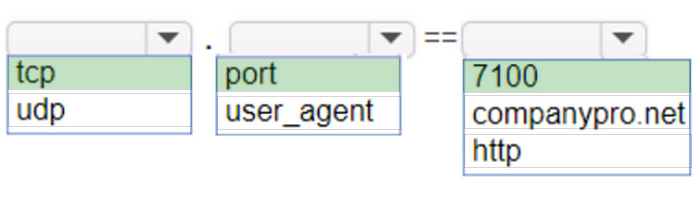
Which Wireshark filter options would you use to filter the results? Complete the command by selecting the correct option from each drop-down list.

Note: You will receive partial credit for each correct selection.

Hot Area:
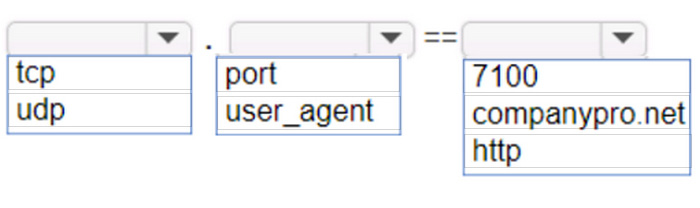
Buy Now

Correct Answer:

To capture packets sent to and received from the URLhttps://www.companypro.net:7100/apiusing Wireshark, you would use the following filter options:

Protocol:tcp

Filter Type:port

Port Number:7100

This filter setup in Wireshark will display all TCP packets that are sent to or received from port 7100, which is the port specified in the URL for the API service. Since HTTPS typically uses TCP as the transport layer protocol, filtering by TCP

and the specific port number will help isolate the relevant packets for troubleshooting the app's data download issues.

cp: The app is using HTTPS, which relies on the TCP protocol for communication. port: The specific port number used by the application, which in this case is 7100. 7100: This is the port specified in the URL (https://

www.companypro.net:7100/api). This filter will capture all TCP traffic on port 7100, allowing you to analyze the packets related to the application's data download.

References:

Wireshark Filters: Wireshark Display Filters

Exam Code: CCST-NETWORKING
Exam Name: Cisco Certified Support Technician (CCST) Networking
Last Update: May 29, 2026
Questions: 40

PDF (Q&A)

$45.99
ADD TO CART

VCE

$49.99
ADD TO CART

PDF + VCE

$59.99
ADD TO CART

Exam2Pass----The Most Reliable Exam Preparation Assistance

There are tens of thousands of certification exam dumps provided on the internet. And how to choose the most reliable one among them is the first problem one certification candidate should face. Exam2Pass provide a shot cut to pass the exam and get the certification. If you need help on any questions or any Exam2Pass exam PDF and VCE simulators, customer support team is ready to help at any time when required.

Home | Guarantee & Policy |  Privacy & Policy |  Terms & Conditions |  How to buy |  FAQs |  About Us |  Contact Us |  Demo |  Reviews

2026 Copyright @ exam2pass.com All trademarks are the property of their respective vendors. We are not associated with any of them.