
EADP19-001 Online Practice Questions and Answers
An ArcGIS user wants to create a tool that reads a Web data source from the U.S. Geological Survey site and create a feature class of earthquakes over magnitude 1 that have occurred in the last seven days. The data source URL is a .txt file
directly usable as x, v event data, once downloaded.
The goal is to have a repeatable process to be run on demand overwriting the output each time with minimal user input and easy to understand for other users to whom the tool is provided.
What should the user do to read and process the data?
A. use a third party scraping application to copy the data to a local file and read it as an x, y event data source
B. manually copy the file to local disk before running and run the Make XY Event Layer tool
C. write a NET component that reads the data presents the data to ArcObjects as an x.v event and creates new features from the data source
D. Write a Python script that imports urllib reads the data with uriopen and read methods and creates features from the data stream
An ArcGIS user receives a model to buffer the weekly crime point features. The users organization has established a standard for symbolizing all buffers using a layer file. The user copies and runs the model on a local machine. The resulting
output buffer uses default symbology.
Why do the output buffers use the default symbology?
A. The layer file uses relative paths
B. The layer file is NOT appearing in the map
C. The model variable was NOT updated
D. The model variable CANNOT be shared
Refer to the exhibits.
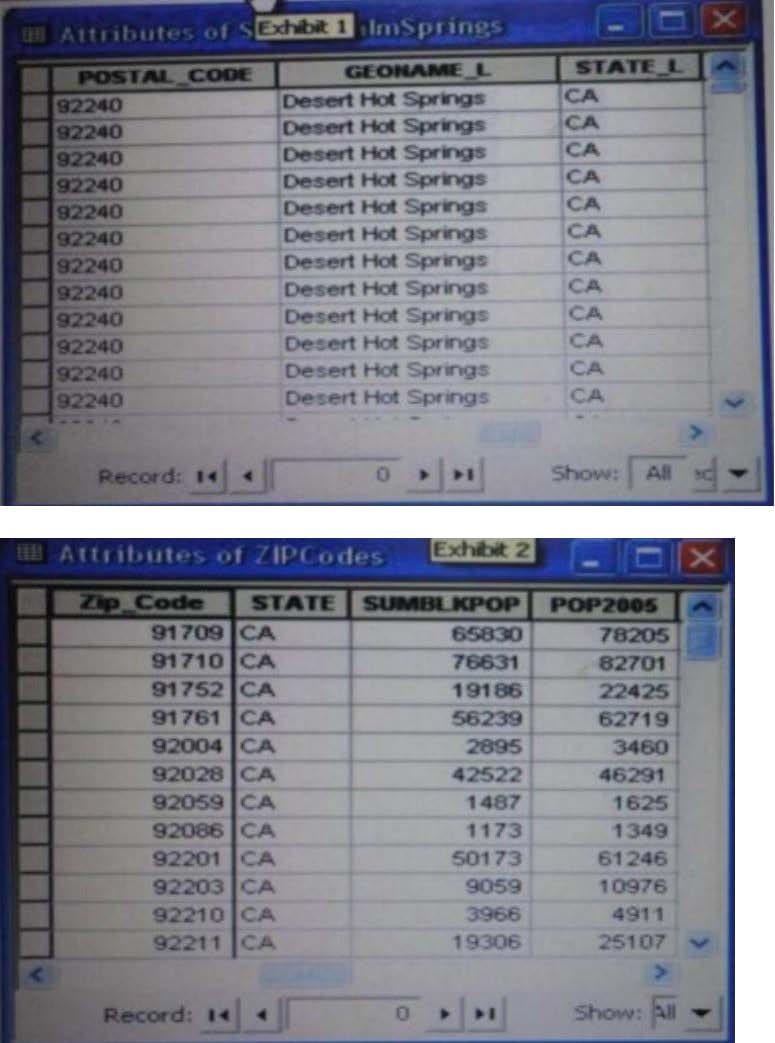
An ArcGIS user is attempting to create a relationship class between the two tables shown in the exhibit using POSTAL_CODE and Zip Code as the origin primary key and destination foreign Keys, respectively. However when the user tries to set the keys zip Cede does not appear in the drop-down list of candidate keys.
What should the user do to successfully create the relationship class?
A. change the relationship type from non attributed to attributed
B. make sure both tables are in the same geodatabase
C. create data type compatible key fields
D. move both tables to the same feature dataset
An ArcGIS user is creating a script tool to automate a common workflow.
Which tool property ensures that the tool only recognizes intended feature data sources?
A. output spatial reference property
B. data type fitter property
C. workspace data property
D. data extent property
An analyst has a multi band raster, but needs just one of the bands for a project. Which geoprocessing tool should be used to extract a single band?
A. Slice (3D Analyst)
B. Extract by Attributes (Spatial Analyst)
C. Composite Bands (Data Management)
D. Clip (Data Management)
An ArcGlS user decides to use labels in a map document because the annotation appears pixelated as the user zooms from the reference scale.
What Is a potential effect of this decision?
A. Label placement will be controlled by the user
B. Text placement will become static
C. Labels will only draw at the reference scale
D. The map will render more slowly
In the Feature Class to Feature Class tool which parameter allows an ArcGlS user to manipulate attributes to be included the output feature class table?
A. input features
B. SQL expression
C. configuration Keyword
D. field mapping
Using the Spatial Analyst IDW (Inverse Distance Weighted) tool an ArcGlS user interpolates a point feature class to a raster. The user notices that some high point values near the edge of the feature class seem to have a dramatic effect on the output.
This occurs even in areas that are far from the high edge values.
Which two parameters should the user consider changing in the IDW tool? (Choose two)
A. z-value field
B. search radius
C. power
D. output cell size
E. weight
An ArcGlS user in a city office has a tool created from a geoprocessing model. The user is planning to share the tool with someone outside their office.
How can the user ensure that others can run the tool without being able to change it?
A. embed the model in the tool
B. make the model read-only
C. set a password for the model
D. share the tool as a.dll file
When rematching geocoding results, a user notices that E St Is being interpreted as East St. How snould a user resolve this Issue for future geocoding?
A. remove the entry defining E to mean east In the geocoding XML files
B. recreate the address locator with new reference data
C. create a composite address locator where E is not recognized as east
D. change E to east in the input table to be geocoded before geocoding