Exam2pass
0 items Sign In or Register
  • Home
  • IT Exams
  • Guarantee
  • FAQs
  • Reviews
  • Contact Us
  • Demo
Exam2pass > HP > HP Certifications > HPE6-A85 > HPE6-A85 Online Practice Questions and Answers

HPE6-A85 Online Practice Questions and Answers

Questions 4

What does the status of "ALFOE" mean when checking LACP with "show lacp interfaces'"?

A. The interface on the local switch is configured as static-LAG

B. LACP is not configured on the peer side

C. LACP is in a synchronizing process

D. LACP is working fine with no problems

Buy Now

Correct Answer: D

Explanation: The status of "ALFOE" means that LACP Link Aggregation Control Protocol (LACP) is a network protocol that provides dynamic negotiation of link aggregation between two devices. LACP allows multiple physical links to be combined into a single logical link for increased bandwidth, redundancy, and load balancing. LACP is defined in IEEE 802.3ad standard. is working fine with no problems when checking LACP with "show lacp interfaces". The status of "ALFOE" is an acronym that stands for:

A: Active - The interface is actively sending LACP packets to negotiate link aggregation with the peer device.

L: Link Up - The interface has physical connectivity with the peer device.

F: Aggregatable - The interface can be aggregated with other interfaces into a single logical link.

O: Synchronized - The interface has successfully negotiated link aggregation parameters with the peer device and can transmit or receive traffic on the logical link.

E: Collecting/Distributing - The interface is collecting incoming traffic from the peer device and distributing outgoing traffic to the peer device on the logical link.

The other options are not correct because:

The interface on the local switch is configured as static-LAG: This option is false because static-LAG does not use LACP to negotiate link aggregation. Static-LAG requires manual configuration of link aggregation parameters on both devices

and does not have any status indicators.

LACP is not configured on the peer side: This option is false because if LACP is not configured on the peer side, the status of the interface would be "ALF? instead of "ALFOE". This means that the interface would not be synchronized or

collecting/distributing with the peer device.

LACP is in a synchronizing process: This option is false because if LACP is in a synchronizing process, the status of the interface would be "ALF-O" instead of "ALFOE". This means that the interface would not be collecting/distributing with

the peer device.

References: https://www.arubanetworks.com/techdocs/AOS- CX_10_08/NOSCG/Content/cx-noscg/lag/lag-overview.htm https://www.arubanetworks.com/techdocs/AOS-CX_10_08/NOSCG/Content/cx- noscg/lag/lag-lacp.htm https:// www.arubanetworks.com/techdocs/AOS- CX_10_08/NOSCG/Content/cx-noscg/lag/lag-lacp-status.htm

Questions 5

You need to troubleshoot an Aruba CX 6200 4-node VSF stack switch that fails to boot correctly Select the option that allows you to access the switch and see the boot options available for OS images and ServiceOS.

A. Member 2 RJ-45 console port

B. Member 2 switch mgmt port

C. Conductor USB-C console port D. Conductor mgmt port using SSH

Buy Now

Correct Answer: C

Explanation: The option that allows you to access the switch and see the boot options available for OS images and ServiceOS is Conductor USB-C console port. This option provides direct access to ServiceOS, which is an operating system

that runs on Aruba CX switches independently of AOS-CX Aruba Operating System CX (AOS-CX) is an operating system that runs on Aruba CX switches . ServiceOS provides low-level functions such as booting, firmware upgrades,

password recovery, hardware diagnostics, switch stacking, and system recovery. ServiceOS can be accessed through one of two methods:

Conductor USB-C console port: This method allows you to connect your PC or laptop to the USB-C console port on any member switch in a VSF stack using a USB-C cable. This method provides direct access to ServiceOS without requiring

any configuration or authentication on AOS-CX.

AOS-CX CLI: This method allows you to access ServiceOS through AOS-CX CLI using SSH or Telnet protocols. This method requires you to configure an IP address on AOS-CX and authenticate with your username and password. To see

the boot options available for OS images and ServiceOS, you need to access ServiceOS through Conductor USB-C console port and enter boot menu command at ServiceOS prompt.

The other options do not allow you to access the switch and see the boot options available for OS images and ServiceOS because:

Member 2 RJ-45 console port: This option allows you to connect your PC or laptop to the RJ-45 console port on any member switch in a VSF stack using an RJ-45 cable. This option provides direct access to AOS-CX CLI, not ServiceOS.

Member 2 switch mgmt port: This option allows you to connect your PC or laptop to the switch mgmt port on any member switch in a VSF stack using an Ethernet cable. This option provides indirect access to AOS-CX CLI through SSH or

Telnet protocols, not ServiceOS.

Conductor mgmt port using SSH: This option allows you to connect your PC or laptop to the mgmt port on any member switch in a VSF stack using an Ethernet cable. This option provides indirect access to AOS-CX CLI through SSH protocol,

not ServiceOS.

References: https://www.arubanetworks.com/techdocs/AOS- CX_10_08/NOSCG/Content/cx-noscg/serviceos/serviceos-overview.htm

https://www.arubanetworks.com/techdocs/AOS-CX_10_08/NOSCG/Content/cx- noscg/serviceos/access-serviceos.htm

https://www.arubanetworks.com/techdocs/AOS- CX_10_08/NOSCG/Content/cx-noscg/serviceos/boot-menu.htm

Questions 6

Which device configuration group types can a user define in Aruba Central during group creation? (Select two.)

A. Security group

B. Template group

C. Default group

D. Ul group

E. ESP group

Buy Now

Correct Answer: BC

Explanation: Aruba Central allows you to create device configuration groups that define common settings for devices within each group. You can create different types of groupsdepending on your network requirements and management

preferences. Two types of groups that you can define in Aruba Central during group creation are:

Template group: A template group allows you to create configuration templates using variables and expressions that can be applied to multiple devices or device groups. Template groups provide flexibility and scalability for managing large-

scale deployments with similar configurations.

Default group: A default group is automatically created when you add devices to Aruba Central for the first time. The default group contains basic configuration settings that are applied to all devices that are not assigned to any other group.

You can modify or delete the default group as needed.

References: https://www.arubanetworks.com/techdocs/Central/latest/content/nms/device- groups.htm

https://www.arubanetworks.com/techdocs/Central/latest/content/nms/template- groups.htm

https://www.arubanetworks.com/techdocs/Central/latest/content/nms/default- group.htm

Questions 7

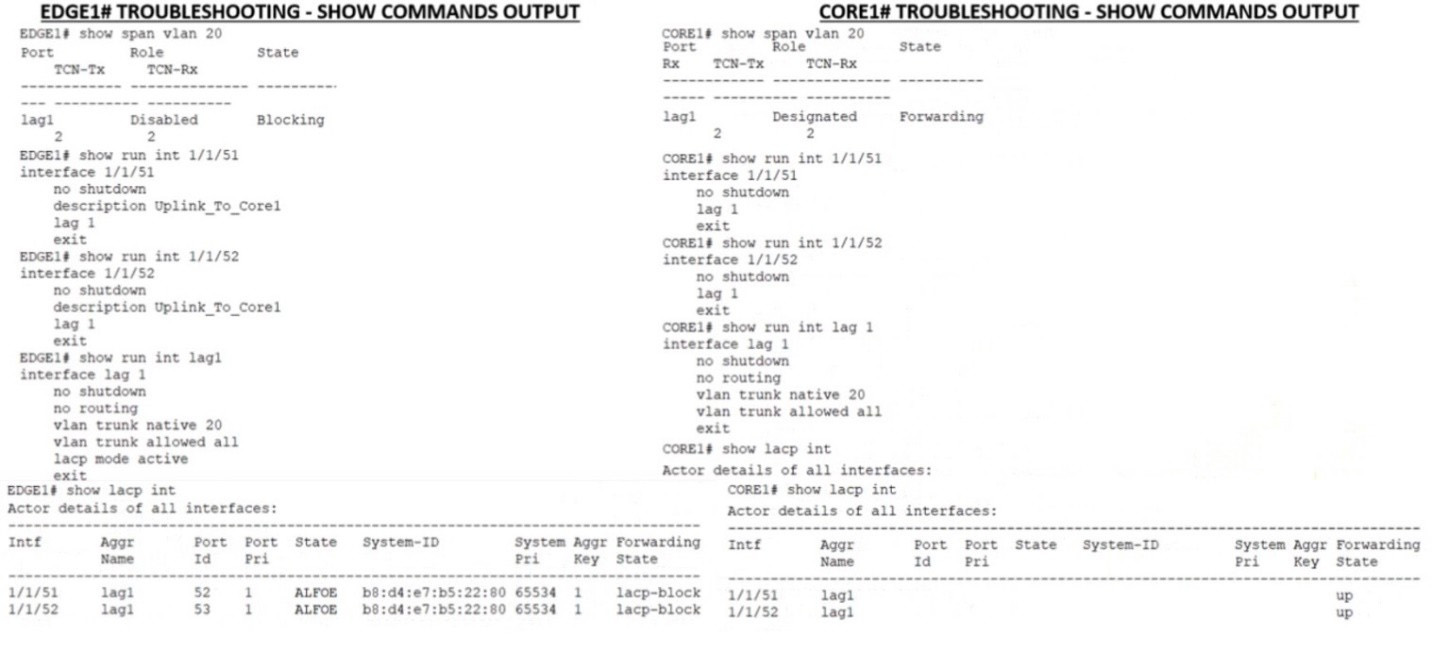
You put in a few show commands on switches EDGE1 and CORE1 to attempt to gather information to troubleshoot the issue Use the show command output images to determine the reason for the EDGE1 uplink being down A. The physical interfaces are not members of the correct LAG.
B. Spanning-Tree block state is preventing the Core uplink from having connectivity to the edge

C. The Core is connected to the incorrect physical interlaces

D. LACP is not configured on the Core uplink

Buy Now

Correct Answer: D

Explanation: LACP is a protocol that allows multiple physical links to be aggregated into a single logical link for increased bandwidth and redundancy. LACP must be configured on both ends of the link for it to work properly. In this case, EDGE1 has LACP configured on its uplink port-channel 1, but CORE1 does not have LACP configured on its corresponding port-channel 1. This causes a mismatch and prevents the link from coming up.

References:https://www.arubanetworks.com/techdocs/ArubaOS_86_Web_Help/Content/ar ubaos-solutions/1-overview/lacp.htm

Questions 8

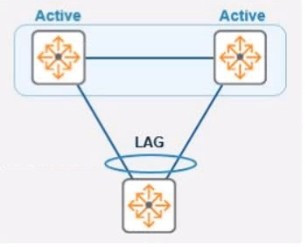
Refer to the exhibit.

In the given topology, a pair of Aruba CX 8325 switches are in a VSX stack using the active gateway What is the nature and behavior of the Virtual IP for the VSX pair if clients are connected to the access switch using VSX as the default gateway?

A. Virtual IP is active on the primary VSX switch Virtual floating IP will failover in case of a failure

B. Virtual IP is active on both CX switches

C. Virtual IP uses SVI IP address synced with VSX

Buy Now

Correct Answer: A

Explanation: Virtual Switching Extension (VSX) is a feature that allows two Aruba CX switches to operate as a single logical device with a single control plane and data plane. VSX provides high availability, scalability, and simplified management for campus and data center networks3. In VSX, one switch is designated as the primary switch and the other as the secondary switch. The primary switch owns and responds to ARP Address Resolution Protocol. ARP is a communication protocol used for discovering the link layer address, such as a MAC address, associated with a given internet layer address, typically an IPv4 address. This mapping is a critical function in the Internet protocol suite. requests for the virtual IP address of the VSX pair4. The virtual IP address is used as the default gateway for clients connected to the access switch. If the primary switch fails, the secondary switch takes over the virtual IP address and continues to forward traffic for the clients5.

References: 3 https://www.arubanetworks.com/techdocs/AOS- CX_10_04/UG/Content/cx-ug/vsx/vsx-overview.htm 4 https://www.arubanetworks.com/techdocs/AOS-CX_10_04/UG/Content/cx-ug/vsx/vsx-ip- addressing.htm 5 https://www.arubanetworks.com/techdocs/AOS- CX_10_04/UG/Content/cx-ug/vsx/vsx-failover.htm

Questions 9

You need to drop excessive broadcast traffic on ingress to an ArubaOS-CX switch What is the best technology to use for this task?

A. Rate limiting

B. DWRR queuing

C. QoS shaping

D. Strict queuing

Buy Now

Correct Answer: A

Explanation: The best technology to use for dropping excessive broadcast traffic on ingress to an ArubaOS-CX switch is rate limiting. Rate limiting is a feature that allows network administrators to control the amount of traffic that enters or leaves a port or a VLAN on a switch by setting bandwidth thresholds or limits. Rate limiting can be used to prevent network congestion, improve network performance, enforce service level agreements(SLAs), or mitigate denial-of-service (DoS) attacks. Rate limiting can be applied to broadcast traffic on ingress to an ArubaOS-CX switch by using the storm-control command in interface configuration mode. This command allows network administrators to specify the percentage of bandwidth or packets per second that can be used by broadcast traffic on an ingress port. If the broadcast traffic exceeds the specified threshold, the switch will drop the excess packets. The other options are not technologies for dropping excessive broadcast traffic on ingress because: DWRR queuing: DWRR stands for Deficit Weighted Round Robin, which is a queuing algorithm that assigns different weights or priorities to different traffic classes or queues on an egress port. DWRR ensures that each queue gets its fair share of bandwidth based on its weight while avoiding starvation of lower priority queues. DWRR does not drop excessive broadcast traffic on ingress, but rather schedules outgoing traffic on egress. QoS shaping: QoS stands for Quality of Service, which is a set of techniques that manage network resources and provide different levels of service to different types of traffic based on their requirements. QoS shaping is a technique that delays or buffers outgoing traffic on an egress port to match the available bandwidth or rate limit. QoS shaping does not drop excessive broadcast traffic on ingress, but rather smooths outgoing traffic on egress. Strict queuing: Strict queuing is another queuing algorithm that assigns different priorities to different traffic classes or queues on an egress port. Strict queuing ensures that higher priority queues are always served before lower priority queues regardless of their bandwidth requirements or weights. Strict queuing does not drop excessive broadcast traffic on ingress, but rather schedules outgoing traffic on egress.

References: https://en.wikipedia.org/wiki/Rate_limiting https://www.arubanetworks.com/techdocs/AOS-CX_10_08/NOSCG/Content/cx- noscg/qos/storm-control.htm https://www.arubanetworks.com/techdocs/AOS- CX_10_08/NOSCG/Content/cx-noscg/qos/dwrr.htm https://www.arubanetworks.com/techdocs/AOS-CX_10_08/NOSCG/Content/cx- noscg/qos/shaping.htm https://www.arubanetworks.com/techdocs/AOS- CX_10_08/NOSCG/Content/cx-noscg/qos/strict.htm

Questions 10

When would you bond multiple 20MHz wide 802.11 channels?

A. To decrease the Signal to Noise Ratio (SNR)

B. To increase throughput between the client and AP

C. To provision highly available AP groups

D. To utilize high gain omni-directional antennas

Buy Now

Correct Answer: B

Explanation: Bonding multiple 20MHz wide 802.11 channels is a technique to create a wider bandwidth channel that supports higher data rate transmissions. It can increase the throughput between the client and AP by using more spectrum resources and reducing interference.

References:https://ieeexplore.ieee.org/document/9288995

Questions 11

What is a weakness introduced into the WLAN environment when WPA2-Personal is used for security?

A. It uses X 509 certificates generated by a Certification Authority

B. The Pairwise Temporal Key (PTK) is specific to each session

C. The Pairwise Master Key (PMK) is shared by ail users

D. It does not use the WPA 4-Way Handshake

Buy Now

Correct Answer: C

Explanation: The weakness introduced into WLAN environment when WPA2-Personal is used for security is that PMK Pairwise Master Key (PMK) is a key that is derived from PSK Pre-shared Key (PSK) is a key that is shared between two parties before communication begins , which are both fixed. This means that all users who know PSK can generate PMK without any authentication process. This also means that if PSK or PMK are compromised by an attacker, they can be used to decrypt all traffic encrypted with PTK Pairwise Temporal Key (PTK) is a key that is derived from PMK, ANonce AuthenticatorNonce (ANonce) is a random number generated by an authenticator (a device that controls access to network resources, such as an AP), SNonce Supplicant Nonce (SNonce) is a random number generated by supplicant (a device that wants to access network resources, such as an STA), AA Authenticator Address (AA) is MAC address of authenticator, SA Supplicant Address (SA) is MAC address of supplicant using Pseudo-Random Function (PRF). PTK consists of four subkeys: KCK Key Confirmation Key (KCK) is used for message integrity check, KEK Key Encryption Key (KEK) is used for encryption key distribution, TK Temporal Key (TK) is used for data encryption, MIC Message Integrity Code (MIC) key. . The other options are not weaknesses because: It uses X 509 certificates generated by a Certification Authority: This option is false because WPA2-Personal does not use X 509 certificates or Certification Authority for authentication. X 509 certificates and Certification Authority are used in WPA2- Enterprise mode, which uses 802.1X and EAP Extensible Authentication Protocol (EAP) is an authentication framework that provides support for multiple authentication methods, such as passwords, certificates, tokens, or biometrics. EAP is used in wireless networks and point-to-point connections to provide secure authentication between a supplicant (a device that wants to access the network) and an authentication server (a device that verifies the credentials of the supplicant). for user authentication with a RADIUS server Remote Authentication Dial-In User Service (RADIUS) is a network protocol that provides centralized authentication, authorization, and accounting (AAA) management for users who connect and use a network service . The Pairwise Temporal Key (PTK) is specific to each session: This option is false because PTK being specific to each session is not a weakness but a strength of WPA2-Personal. PTK being specific to each session means that it changes periodically during communication based on time or number of packets transmitted. This prevents replay attacks and increases security of data encryption. It does not use the WPA 4-Way Handshake: This option is false because WPA2- Personal does use the WPA 4-Way Handshake for key negotiation. The WPA 4- Way Handshake is a process that allows the station and the access point to exchange ANonce and SNonce and derive PTK from PMK. The WPA 4-Way Handshake also allows the station and the access point to verify each other's PMK and confirm the installation of PTK.

References: https://en.wikipedia.org/wiki/Wi-Fi_Protected_Access#WPA_key_hierarchy_and_management https://www.cwnp.com/wp- content/uploads/pdf/WPA2.pdf

Questions 12

You are configuring a network with a stacked pair of 6300M switches used for distribution and layer 3 services. You create a new VLAN for users that will be used on multiple access stacks of CX6200 switches connected downstream of the distribution stack You will be creating multiple VLANs/subnets similar to this will be utilized in multiple access stacks

What is the correct way to configure the routable interface for the subnet to be associated with this VLAN?

A. Create a physically routed interface in the subnet on the 6300M stack for each downstream switch.

B. Create an SVl in the subnet on each downstream switch

C. Create an SVl in the subnet on the 6300M stack, and assign the management address of each downstream switch stack to a different IP address in the same subnet

D. Create an SVl in the subnet on the 6300M stack.

Buy Now

Correct Answer: D

Explanation: The correct way to configure the routable interface for the subnet to be associated with this VLAN is to create an SVI Switched Virtual Interface (SVI) Switched Virtual Interface (SVI) is a virtual interface on a switch that represents a VLAN and provides Layer 3 routing functions for that VLAN . SVIs are used to enable inter-VLAN routing , provide gateway addresses for hosts in VLANs , apply ACLs or QoS policies to VLANs , etc . SVIs have some advantages over physical routed interfaces such as saving interface ports , reducing cable costs , simplifying network design , etc . SVIs are usually numbered according to their VLAN IDs (e.g., vlan 10) and assigned IP addresses within the subnet of their VLANs . SVIs can be created and configured by using commands such as interface vlan , ip address , no shutdown , etc . SVIs can be verified by using commands such as show ip interface brief , show vlan , show ip route , etc . in the subnet on the 6300M stack. An SVI is a virtual interface on a switch that represents a VLAN and provides Layer 3 routing functions for that VLAN. Creating an SVI in the subnet on the 6300M stack allows the switch to act as a gateway for the users in that VLAN and enable inter-VLAN routing between different subnets. Creating an SVI in the subnet on the 6300M stack also simplifies network design and management by reducing the number of physical interfaces and cables required for routing. The other options are not correct ways to configure the routable interface for the subnet to be associated with this VLAN because: Create a physically routed interface in the subnet on the 6300M stack for each downstream switch: This option is incorrect because creating a physically routedinterface in the subnet on the 6300M stack for each downstream switch would require using one physical port and cable per downstream switch, which would consume interface resources and increase cable costs. Creating a physically routed interface in the subnet on the 6300M stack for each downstream switch would also complicate network design and management by requiring separate routing configurations and policies for each interface. Create an SVl in the subnet on each downstream switch: This option is incorrect because creating an SVI in the subnet on each downstream switch would not enable inter-VLAN routing between different subnets, as each downstream switch would act as a gateway for its own VLAN only. Creating an SVI in the subnet on each downstream switch would also create duplicate IP addresses in the same subnet, which would cause IP conflicts and routing errors. Create an SVl in the subnet on the 6300M stack, and assign the management address of each downstream switch stack to a different IP address in the same subnet: This option is incorrect because creating an SVI in the subnet on the 6300M stack, and assigning the management address of each downstream switch stack to a different IP address in the same subnet would not enable inter-VLAN routing between different subnets, as each downstream switch would still act as a gateway for its own VLAN only. Creating an SVI in the subnet on the 6300M stack, and assigning the management address of each downstream switch stack to a different IP address in the same subnet would also create unnecessary IP addresses in the same subnet, which would waste IP space and complicate network management.

References: https://www.arubanetworks.com/techdocs/AOS-CX/10.05/HTML/5200- 7295/index.html https://www.arubanetworks.com/techdocs/AOS-CX/10.05/HTML/5200- 7295/cx-noscg/l3-routing/l3-routing-overview.htm https://www.arubanetworks.com/techdocs/AOS-CX/10.05/HTML/5200-7295/cx-noscg/l3- routing/l3-routing-config.htm

Questions 13

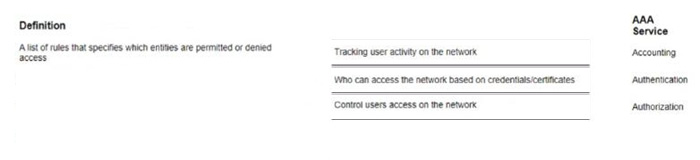
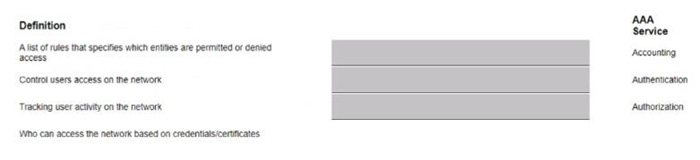
Match each AAA service with its correct definition (Matches may be used more than once or not at all)

Select and Place:
Buy Now

Correct Answer:

Exam Code: HPE6-A85
Exam Name: Aruba Certified Campus Access Associate
Last Update: Jun 18, 2026
Questions: 118

PDF (Q&A)

$45.99
ADD TO CART

VCE

$49.99
ADD TO CART

PDF + VCE

$59.99
ADD TO CART

Exam2Pass----The Most Reliable Exam Preparation Assistance

There are tens of thousands of certification exam dumps provided on the internet. And how to choose the most reliable one among them is the first problem one certification candidate should face. Exam2Pass provide a shot cut to pass the exam and get the certification. If you need help on any questions or any Exam2Pass exam PDF and VCE simulators, customer support team is ready to help at any time when required.

Home | Guarantee & Policy |  Privacy & Policy |  Terms & Conditions |  How to buy |  FAQs |  About Us |  Contact Us |  Demo |  Reviews

2026 Copyright @ exam2pass.com All trademarks are the property of their respective vendors. We are not associated with any of them.