
MAYA12-A Online Practice Questions and Answers
What does the Search and Replace Names option help you rename?
A. One object at a time,
B. Multiple objects at a time.
C. Multiple objects and hierarchies
D. Objects and Attribute names
What modes can you work in when modeling with Subdivision surfaces?
A. Polygon mode and NURBS mode
B. Standard mode and Polygon mode.
C. Standard mode and Coarser mode.
D. NURBS mode and Component mode.
To control a Soft Body simula-tion that is out of hand, you can...
A. use Springs to control the simulation if it gets erratic
B. use a Pin Constraint to 'pin down' the particles that act erratically during the simulation
C. use an nDynamics solver to control the simulation
D. use rigid bodies and converts them to soft bodies.
Which of the following is true of the Specular Color Attribute in a Blinn Shader?
A. Has a default value of 0.5.
B. Controls the color of shiny highlights on the surface.
C. Controls the spread of the specular highlight.
D. Both A and B
What is the syntax to add a single-line comment in a script?
A.//
B. <>
C. "
D. ==
A Boolean operation is performed using a Cube and a Sphere. The image below represents:
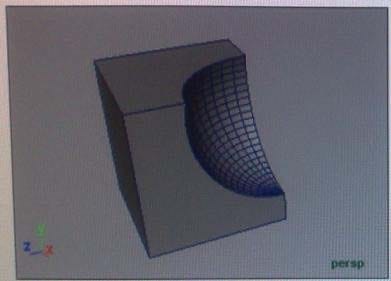
A. Intersection of a Sphere and a Cube
B. Union of a Cube and a Sphere.
C. Difference of a Sphere out of a Cube.
D. None of the above
What will a Dmap shadow do that a Raytrace Shadow will not?
A Dmap shadow will...
A. be visible in an IPR
B. create volumetric shadows through a light fog
C. produces correct shadows from transparent colored surfaces
D. produces correct shadows from Cloud Render Type particles
What is meant by 'sampling'?
A. The amount of Rendering Layers to be calculated in an image
B. The amount of times the software will examine different areas of a pixel
C. The number of photons that get emitted into the scene.
D. None of the above
To composite two layers together you would use...
A. Composition settings
B. Garbage Mask
C. Remap Color
D. Blend and Comp
Which is the correct method to make the current transformations on the selected object be the object's zero position
A. Edit>Delete option
B. Modify>Freeze Transformations option.
C. Modify>Delete Attribute Transformations option.
D. Skeleton>OrientJoint>Freeze Transformations option