Exam2pass
0 items Sign In or Register
  • Home
  • IT Exams
  • Guarantee
  • FAQs
  • Reviews
  • Contact Us
  • Demo
Exam2pass > Microsoft > Microsoft Certifications > MB-310 > MB-310 Online Practice Questions and Answers

MB-310 Online Practice Questions and Answers

Questions 4

You need to ensure that captured employee mobile receipts automatically match the transactions to resolve the User1 issue.

Which feature should you enable?

A. Show receipts during itemization

B. Define expense policy for receipts

C. Expense management workspace

D. Expense reports re-imagined

Buy Now

Correct Answer: D

Note: User1 installed the Expense Management Service add-in and implemented the auto-match and create expense from receipt features but the receipt images do not match the corporate card transactions. In the Feature management workspace, turn on the following features:

1.

Expense reports re-imagined

2.

Auto-match and create an expense from receipt

3.

Install add-in before enabling the feature.

Reference: https://www.linkedin.com/pulse/expense-management-add-in-dynamics-365-finance-eralp-erakalin

Questions 5

You are the accounts receivable manager of an organization. The organization recently sold machinery to a customer.

You need to register a transaction for the sale of the machinery by using a free text invoice for fixed assets.

Which transaction type should you use?

A. Acquisition

B. Value adjustments

C. Depreciation

D. Disposal

Buy Now

Correct Answer: D

Questions 6

A company uses Dynamics 365 Finance to manage budgets.

You need to reallocate funds during the year.

Which budget code should you use

A. Carry-forward

B. Zero-based

C. Pre-encumbrance

D. Transfer

Buy Now

Correct Answer: D

Reference: https://docs.microsoft.com/en-us/dynamics365/finance/budgeting/basic-budgeting-overview-configuration

Questions 7

An organization plans to use defined journal names for each purpose. They want to ensure that journal processing is easier and more secure. The organization has the following requirements:

1.

Set up restrictions on the account type and segment values.

2.

Capture data accurately for offset accounts, currency, and financial dimensions.

3.

Maintain internal control and establish materiality limits.

You need to set up journal name elements to meet these requirements.

Which three journal elements should you configureEach correct answer presents part of the solution.

NOTE: Each correct selection is worth one point.

A. workflow approval

B. account type

C. journal type

D. default values

E. journal control

Buy Now

Correct Answer: ADE

"On the Journal names page, you can set up the following elements:

Workflow approval

Questions 8

You configure the basic budgeting functionality of Dynamics 365 Finance. You add budget values and actuals in the system.

You need to compare the budget values with the actual values.

Which three actions should you perform?

Each correct answer presents part of the solution.

NOTE: Each correct selection is worth one point.

A. Compare customer and vendor balances and budget register entries that are posted in the system.

B. Review budget and actual amounts that are spread across fiscal periods.

C. Generate a report on the differences between the actual fixed assets amounts and the preliminary budgeted amounts in the system.

D. Review general ledger transactions that are included in the calculated actuals amounts.

E. Drill through the details of the budget amount in budget register entries posted in the system.

Buy Now

Correct Answer: BCD

Explanation:

Analyze Actual Amounts Versus Budgeted Amounts

As a part of gathering, analyzing, and sharing your company data, you view actual amounts compared to budgeted amounts for all accounts and for several periods.

D: To analyze budgeted amounts, you must first create general ledger (G/L) budgets.

View a G/L budget

In a budget with dimensions, you can filter the entries and see specific budgets.

Choose the Search icon, enter G/L Budgets, then choose the related link.

On the G/L Budgets page, open the budget you want to view.

At the top of the page, fill in the fields necessary to define what is shown. Hover over a field to read a short description.

View actual and budgeted amounts for all accounts

You can view general ledger budgets and compare them with actual figures in several areas of Business Central.

Choose the Search icon, enter Chart of Accounts, then choose the related link.

On the Chart of Accounts page, choose the G/L Balance/Budget action.

On the Options FastTab, fill in the fields as necessary to define what is displayed in the table.

Hover over a field on the table to read a short description about the displayed amount.

B: To view actual and budgeted amounts for several periods

Instead of viewing the actual and budgeted amounts for all accounts within a single period, you can view a number of periods for a single account.

Choose the Search icon, enter Chart of Accounts, then choose the related link.

On the Chart of Accounts page, select the relevant general ledger account, then choose the G/L Account Balance/Budget action.

On the Options FastTab, fill in the fields as necessary to define what is displayed in the table.

On the Lines FastTab, hover over a field on the table to read a short description about the displayed amount.

C: Actual versus budget report (BudgetBalancesActuals)

The Actual versus budget report displays budget balances for the original budget, revised budget, actual expenditures, and variances. The original budget amounts are the sum of expense and revenue budget amounts. The revised budget

amounts are the sum of original budget, revisions, transfers, and carry-forward amounts. The actual expenditures are the sum of the debits and credits that were posted for the selected financial dimension values. Variances are the differences

between actual and revised budget amounts, expressed as amounts and percentages. The report is grouped by budget model and dimension values.

Reference:

https://learn.microsoft.com/en-us/dynamics365/business-central/bi-how-analyze-actual-versus-budget

https://learn.microsoft.com/en-us/dynamicsax-2012/appuser-itpro/actual-versus-budget-report-budgetbalancesactuals

Questions 9

HOTSPOT

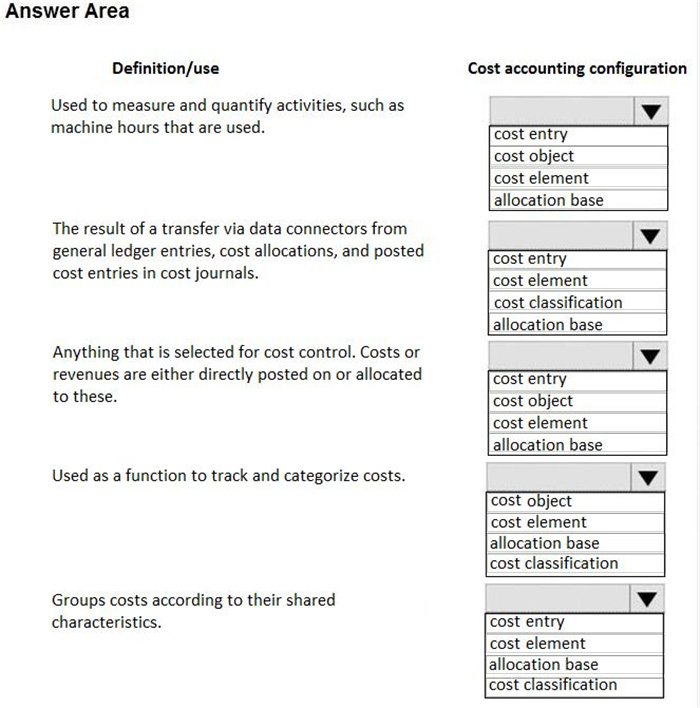
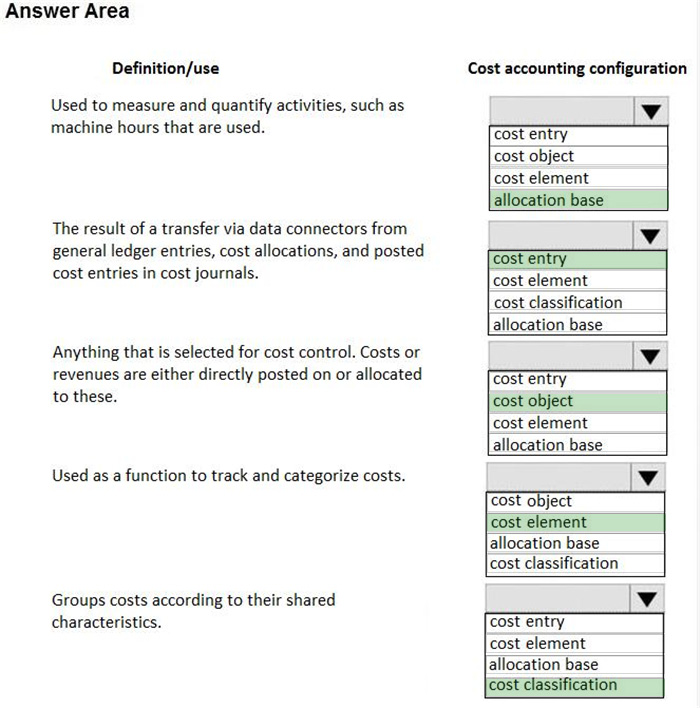
A client plans to use the cost accounting module in Dynamics 365 Finance.

You need to associate the correct definitions to the correct cost accounting concepts.

Which terms match the definitionsTo answer, select the appropriate configuration in the answer area.

NOTE: Each correct selection is worth one point.

Hot Area:
Buy Now

Correct Answer:

Reference: https://docs.microsoft.com/en-us/dynamics365/unified-operations/financials/cost-accounting/terms-cost-accounting

Questions 10

HOTSPOT

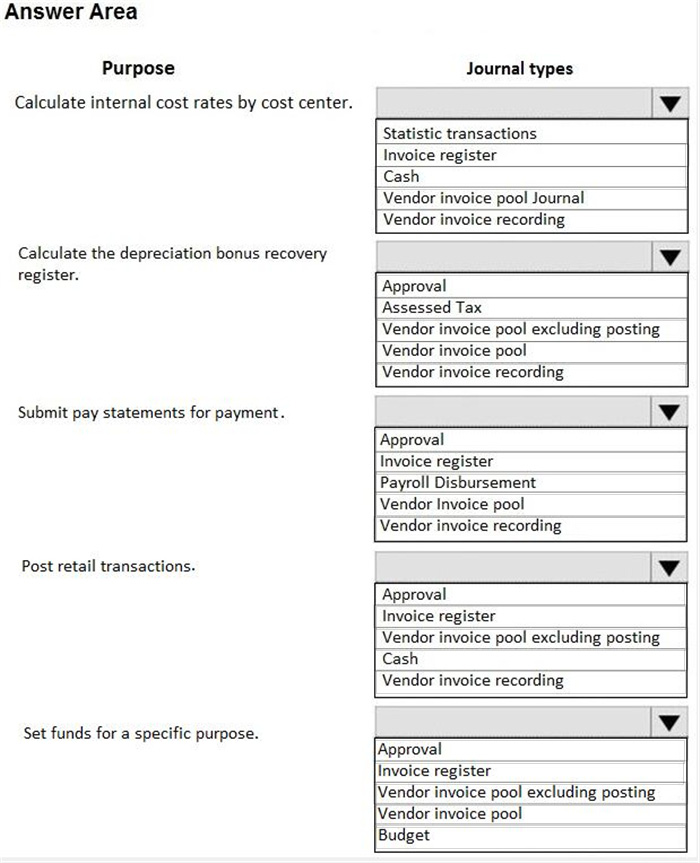
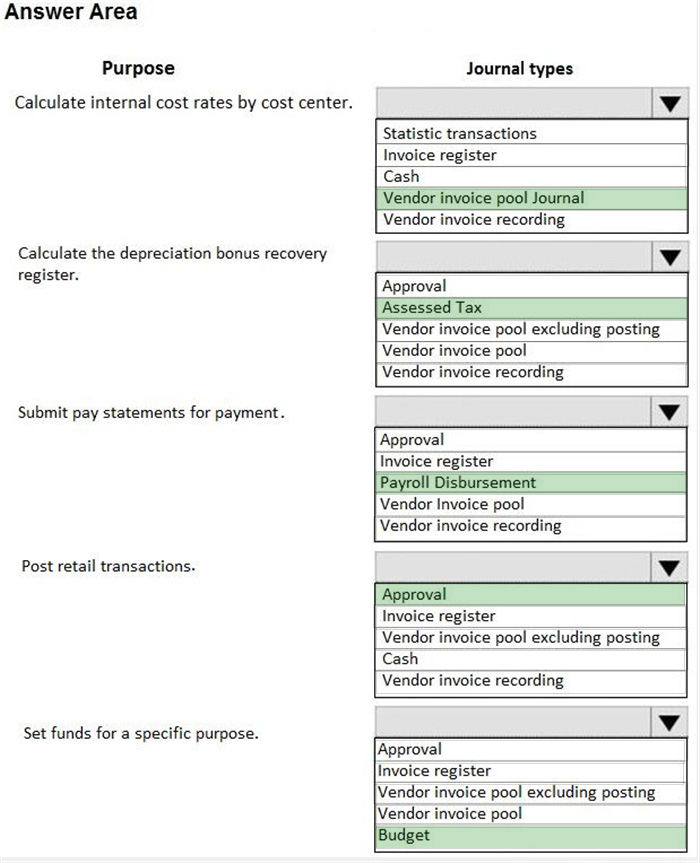
A company is using vendors to produce components for its products.

Journal types are not configured to support vendor invoices.

You need to identify and configure journals to use for vendor invoices.

Which journal types should you useTo answer, select the appropriate options in the answer area.

NOTE: Each correct selection is worth one point.

Hot Area:
Buy Now

Correct Answer:

Questions 11

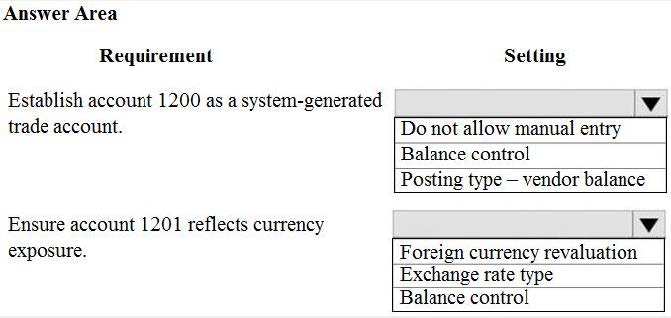
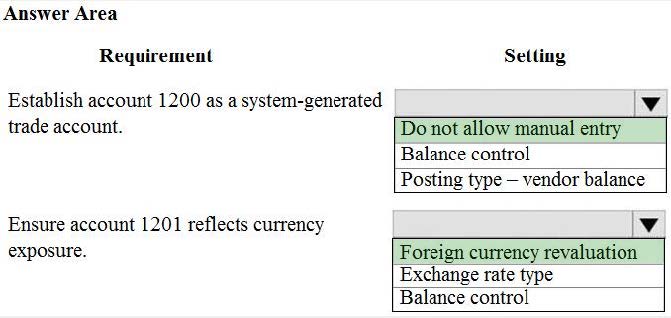
HOTSPOT

You need to configure settings to resolve User1's issue.

Which settings should you use? To answer, select the appropriate options in the answer area.

NOTE: Each correct selection is worth one point.

Hot Area:
Buy Now

Correct Answer:

Questions 12

HOTSPOT

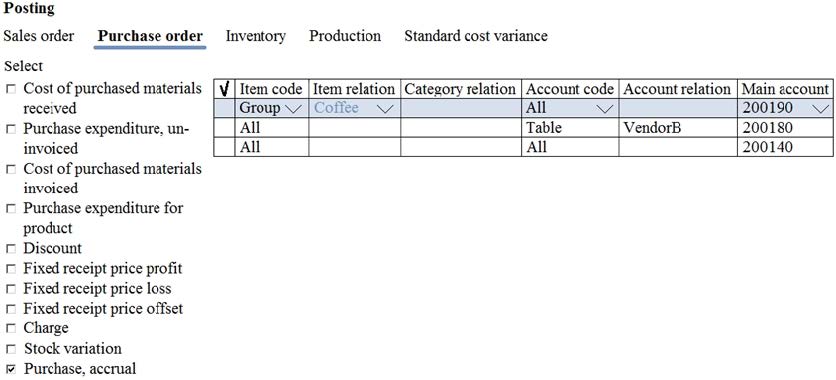
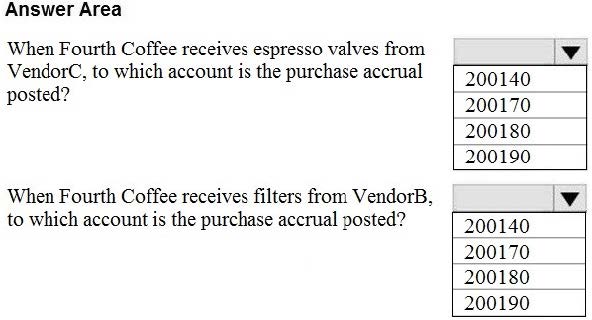
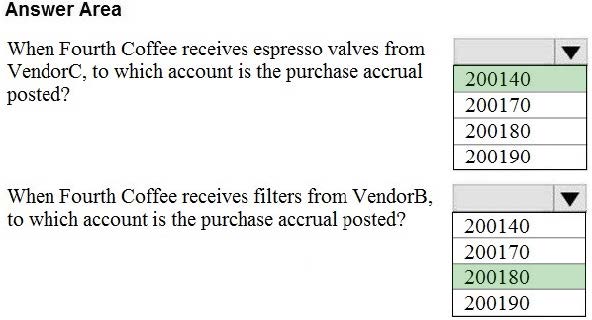
The posting configuration for a purchase order is shown as follows:

Use the drop-down menus to select the answer choice that answers each question based on the information presented in the graphic.

NOTE: Each correct selection is worth one point.

Hot Area:
Buy Now

Correct Answer:

Questions 13

DRAG DROP

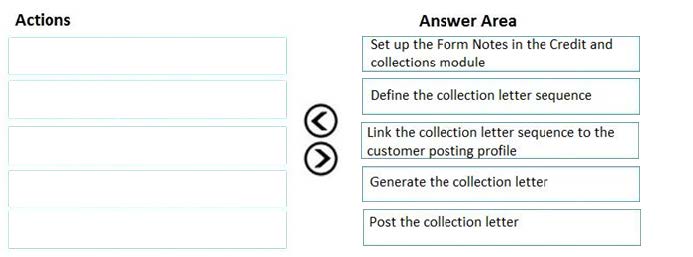
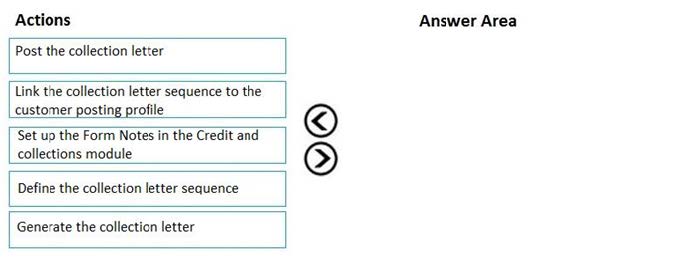
A client observes that some customers are late paying their invoices. The client wants to use the Credit and Collections functionality to send collection letters to customers.

You need to configure the system to support collection letter functionality and processing.

In which order should you perform the actionsTo answer, move all actions from the list of actions to the answer area and arrange them in the correct order.

Select and Place:
Buy Now

Correct Answer:

Reference: http://d365tour.com/en/microsoft-dynamics-d365o/finance-d365fo-en/collection-letters/

Exam Code: MB-310
Exam Name: Microsoft Dynamics 365 Finance
Last Update: May 31, 2026
Questions: 472

PDF (Q&A)

$45.99
ADD TO CART

VCE

$49.99
ADD TO CART

PDF + VCE

$59.99
ADD TO CART

Exam2Pass----The Most Reliable Exam Preparation Assistance

There are tens of thousands of certification exam dumps provided on the internet. And how to choose the most reliable one among them is the first problem one certification candidate should face. Exam2Pass provide a shot cut to pass the exam and get the certification. If you need help on any questions or any Exam2Pass exam PDF and VCE simulators, customer support team is ready to help at any time when required.

Home | Guarantee & Policy |  Privacy & Policy |  Terms & Conditions |  How to buy |  FAQs |  About Us |  Contact Us |  Demo |  Reviews

2026 Copyright @ exam2pass.com All trademarks are the property of their respective vendors. We are not associated with any of them.