MS-700 Online Practice Questions and Answers
You need to configure the environment to meet the security requirements for the RandD group. What should you do first?
A. Start the information barrier policy application.
B. Add an identity provider.
C. Create two information barrier segments.
D. Create one information barrier policy.
You need to configure the user accounts of the sales department users to meet the security requirements. What should you do for each user?
A. From PowerShell, run the Grant-CsTeamsUpgradePolicy -PolicyName SfBWithTeamsCollabAndMeetingscmdlet.
B. From the Microsoft Teams admin center, set the Microsoft Teams upgrade policy to Islands coexistence mode.
C. From PowerShell, run the Grant-CsTeamsUpgradePolicy -PolicyName Islands cmdlet.
D. From PowerShell, run the Grant-CsTeamsUpgradePolicy -PolicyName SfBOnlycmdlet.
You need to identify the requirements for the voice pilot project.
Which two actions should you perform? Each correct answer presents part of the solution.
NOTE: Each correct selection is worth one point.
A. Assign an additional license and phone number to each user.
B. Deploy a Session Border Controller (SBC) for Litware.
C. Purchase a Calling Plan for each user.
D. Create a dial plan for Litware.
E. Purchase a Calling Plan for Litware.
Your company has a Microsoft 365 subscription.
You plan to configure the environment to allow external users to collaborate in Microsoft Teams by using guest access.
The company implements a new security policy that has the following requirements:
Only guest users from specific domains must be allowed to connect to collaborate by using Microsoft Teams.
Guest users must be prevented from inviting other guests.
You need to recommend a solution to meet the security policy requirements.
Solution: From the Azure Active Directory, you modify the External collaboration settings.
Does this meet the goal?
A. Yes
B. No
You work as a Systems Administrator for your company. The company has a subscription to Microsoft 365 and all users have a Microsoft 365 E3 license.
The company network includes Windows Server 2019 servers that host a Virtual Desktop Infrastructure (VDI).
All company users use the Microsoft Teams desktop client in non-persistent virtual desktops.
Microsoft has released an update to the Microsoft Teams client that includes several new features.
You need to ensure that all virtual desktop users are able to use the updated Microsoft Teams clients.
Which of the following actions should you perform?
A. Configure the Teams Upgrade Policy with the Upgrade to Teams setting.
B. Uninstall the Microsoft Teams MSI package from the VM image and install the latest version.
C. Configure a Group Policy Object to deploy the latest version of the Microsoft Teams client.
D. Configure Windows Updates on the servers hosting the VDI.
You have a Microsoft 365 E5 subscription that uses Microsoft Teams.
Users report that their presence information is available to external partners.
You need to ensure that the presence information is available only to the external partners on the users' contact lists.
What should you do?
A. From PowerShell, run Set-CsTenantFederationConfiguration AllowFederatedUsers $false.
B. From PowerShell, run Set-CsPrivacyConfiguration -EnablePrivacyMode $true.
C. From the Microsoft Teams admin center, add the external partners to the Allow only specific external domains list.
D. From External collaboration settings in the Azure Active Directory admin center, configure Guest user access restrictions.
HOTSPOT
You are Microsoft Teams administrator for your company.
You have the Org-wide app settings shown in the App Settings exhibit. (Click the App Settings tab.)
The company's global app permission policy is configured as shown in the Permission Policy exhibit. (Click the Permission Policy tab.)
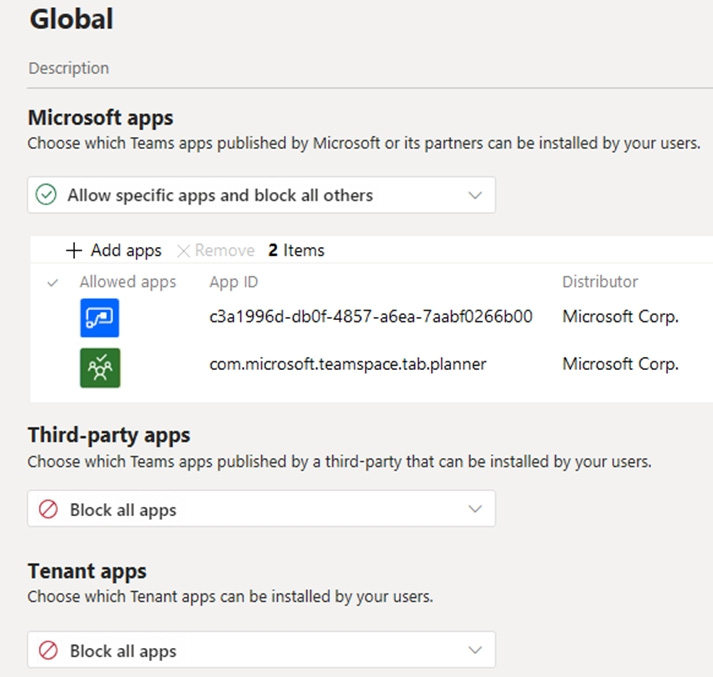
The company's global app setup policy is configured as shown in the Setup Policy exhibit. (Click the Setup Policy tab.)
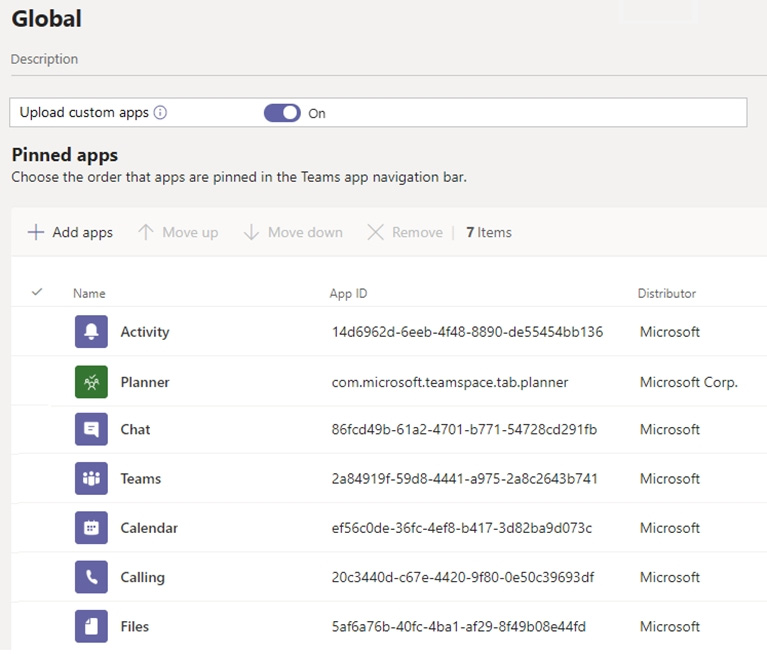
For each of the following statements, select Yes if the statement is true. Otherwise, select No.
NOTE: Each correct selection is worth one point.
Hot Area:
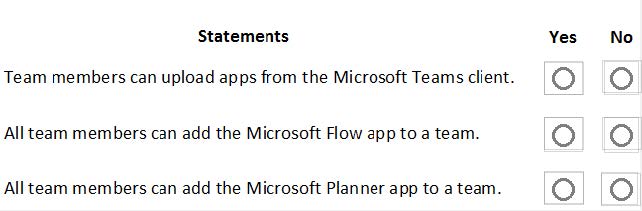
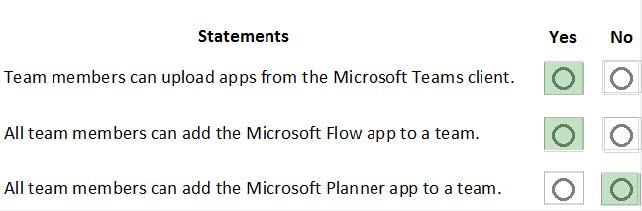
HOTSPOT
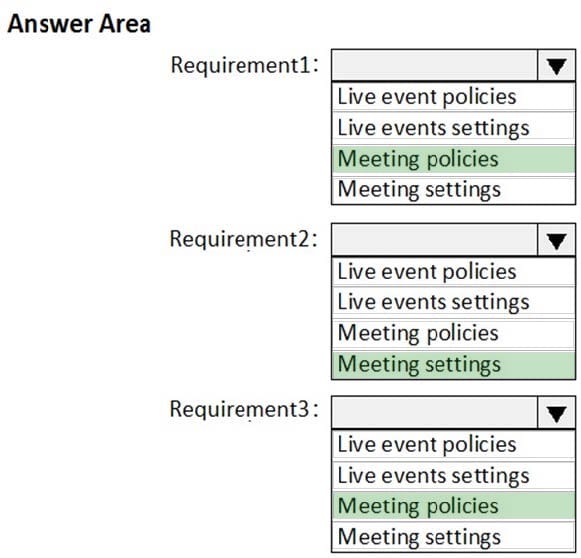
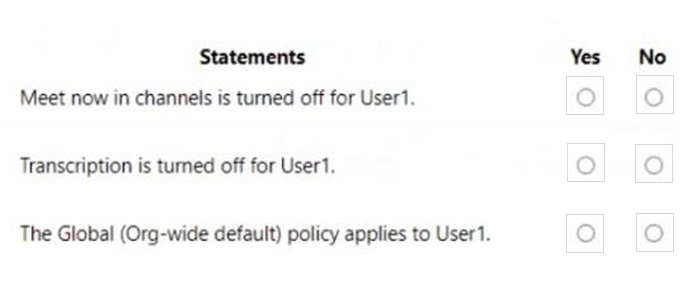
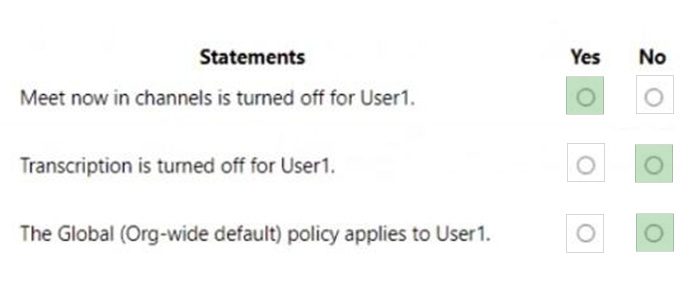
You have a Microsoft 365 subscription that uses Microsoft Teams and contains a user named User1 and three groups named Group1 , Group2 and Group3. User1 is a member of Group1, Group2, and Group3.
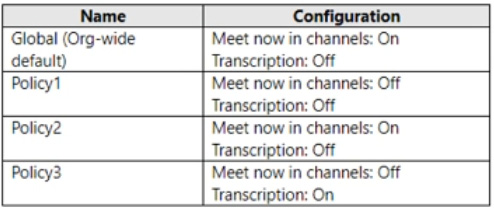
The subscription has the meeting policies shown in the following table.
The meeting policies are assigned to groups as shown in the following table.
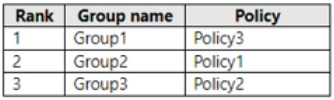
For each of the following statements, select Yes if the statement is true. Otherwise, select No.
Hot Area:
HOTSPOT
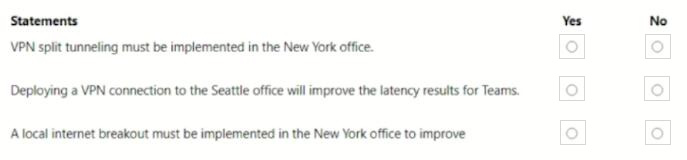
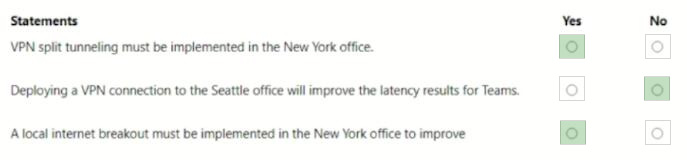
Your company has offices in New York and Seattle.
You have a Microsoft 365 subscription that uses Teams.
You plan to assess network connectivity and make recommendations to optimize connectivity from each office to Teams.
You run the Microsoft 365 network connectivity test tool at both offices and produce the results shown in the following table.
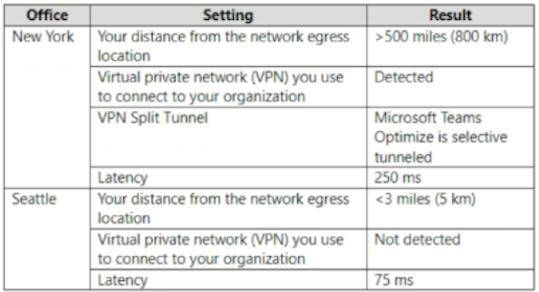
For each of the following statements, select Yes if True. Otherwise select No. NOTE: Each correct selection is worth one point.
Hot Area:
DRAG DROP
Your company uses Teams.
Two users named User1 and User2 use the Teams client for Windows.
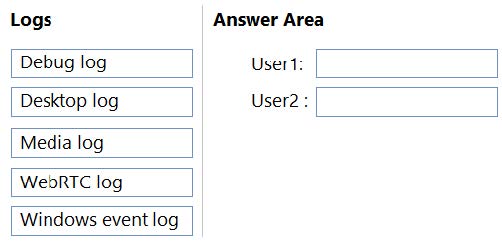
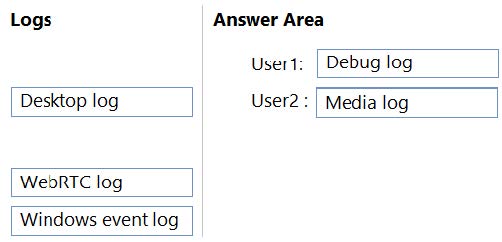
The users report the following issues:
1.
User1 reports that when attempting to sign in, the Teams client remains on the sign-in page.
2.
User2 reports receiving an error when attempting to screen share during a Teams meeting.
You need to troubleshoot the issues.
Which client-side log should you review for each user? To answer, drag the appropriate logs to the correct users. Each log may be used once, more than once, or not at all. You may need to drag the split bar between panes or scroll to view
content.
NOTE: Each correct selection is worth one point.
Select and Place: