
QSSA2018 Online Practice Questions and Answers
A system administrator adds RIM B to a two-node environment using the central node as the proxy. The system administrator is using the default virtual proxy for the central node to access the hub.
The system administrator sets up a load balancing rule to have all apps served on both RIM A and RIM B. The system administrator performs the following steps:
1.
Disables the default load balancing rule, "ResourcesOnNonCentralNodes"
2.
Creates a new rule with the Resource filter "App_*" and checks Load balancing
3.
Sets the condition to ((node.name="RIM A" or node.name="RIM B"))
The rule is successfully verified. The system administrator has users log in to the hub and open apps to verify that they are opening on RIM B. However, after multiple users open the same app, there is still NO report of activity on RIM B.
What is causing this issue?
A. There is a rule overlapping the custom load balancing rule
B. The filter should be ((node.name="RIM A") and (node.name="RIM B"))
C. A network connection problem is occurring and the load balancing is NOT working
D. The RIM B Engine has NOT been added to the virtual proxy
A domain user is granted access and could successfully log into the hub yesterday. The same domain user attempts to log in into the hub today, and receives this error message:
Your account is inactive. Contact your administrator to activate it.
The user is able to successfully log into the Windows domain network. The user did NOT change the
password recently. The user has NO limited working hours in the Active Directory.
What should the system administrator investigate to determine the cause of this error message?
A. The user properties in the QMC
B. The Qlik Sense proxy logs
C. The security rules which impact the user
D. The Windows event viewer
A customer uses Qlik Sense Enterprise v3.2 SR5 and wants to upgrade to the latest version. Qlik Sense Enterprise is running on Microsoft Windows Server 2008 R2.
Which option should the system administrator recommend?
A. Run Microsoft Windows Updates to prepare Windows Server 2008 R2 for the latest Qlik Sense version
B. Download the latest patch, Qlik_Sense_update.exe, and install it using Windows compatibility mode
C. Upgrade to Microsoft Windows Server 2012 or later
D. Upgrade only up to the Qlik Sense February 2018 version
In a Qlik Sense environment, users in the Finance department can successfully log in to the hub open or edit apps in the Finance stream.
Developers in the Finance department are unable to modify the HTML code for widgets.
Where should the system administrator determine the source of this issue?
A. In Audit, select Content libraries as target resource, filter by Group, and select Hub as the environment
B. In Audit, select Extension as target resource, filter by Blocked, and select Hub as the environment
C. In Audit, select App objects as target resource, filter by User directory, and select Hub as the environment
D. In Audit, select Extension as target resource, filter by Group, and select Hub as the environment
A system administrator needs to set up a solution for mobile device users to access the Qlik Sense hub. The solution must meet several requirements: Support iOS devices Can be used in remote locations where users do NOT have laptop or desktop computers Ability to access Qlik Sense outside the office network without a compatible tunnel solution Ability to access Qlik Sense using a secure gateway
What should the system administrator do to meet these requirements?
A. Download the QVF and copy it to the mobile devices
B. Copy the SSL certificates to the iOS devices, and then access the hub via a browser
C. Set up access to the Qlik Sense hub via VPN
D. Implement an Enterprise Mobile Management solution
A system administrator has a Qlik Sense environment with a central node and a scheduler node. One of the apps loads data from text files, which are located in the FinanceData folder on the D: drive on the central node.
The system administrator creates a folder data connection and sets Name = Finance Data and Path = D: \FinanceData.
When the reload task runs for the first time, it fails.
What is the cause of the error?
A. The network share is NOT configured yet
B. Resources are limited in the current scheduler node
C. Port 4747 was NOT opened on the central node
D. Access permissions to the FinanceData folder are NOT granted to users
A system administrator installs Qlik Sense Enterprise and is testing the product with a small team of 10 users.
The users report that the page is NOT trusted on their machines and they receive a certificate warning message. When the system administrator tries to validate this feedback on the server, the administrator does NOT see the same issue.
The system administrator completes the following steps in the proxy configuration: Opens all necessary ports Checks in MMC that there is a personal certificate on the server Creates a DNS entry for an easier URL Tries to connect with various Internet browsers on different machines including mobile devices Adds the page to trusted sites in the Internet configurations Installs OpenSSL in the environment
Which steps should the system administrator take to resolve this issue?
A. 1. Generate a valid certificate for organizational needs using OpenSSL
2.
Add the certificate to the personal certificate store of the Qlik Sense Service User
3.
Add the thumbprint of the third-party certificate to the proxy configuration in the QMC
B. 1. Acquire a third-party certificate from a trusted root certificate authority (CA)
2.
Add the certificate to the personal local computer certificate store
3.
Add the thumbprint of the third-party certificate to the proxy configuration in the QMC
C. 1. Acquire a third-party certificate from a trusted root certificate authority (CA)
2.
Add the certificate to the personal certificate store of the Qlik Sense Service User
3.
Add the thumbprint of the third-party certificate to the proxy configuration in the QMC
D. 1. Acquire a third-party certificate from a trusted root certificate authority (CA) including private key
2.
Add the certificate to the personal local computer certificate store
3.
Add the thumbprint of the third-party certificate to the proxy configuration in the QMC

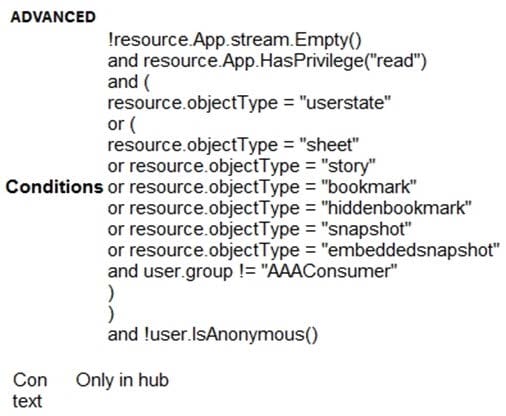
Refer to the exhibit.
A system administrator creates the security rule shown. No other custom security rules exist.
What effect will the security rule have when applied to a user?
A. If the user is in AAAConsumer group, the user can create app objects in published apps
B. If the user is NOT in AAAConsumer group, the user cannot create sheets
C. If the user is NOT in AAAConsumer group, the user can create app objects in published apps
D. If the user is NOT in AAAConsumer group, the user can create app objects in non-published apps
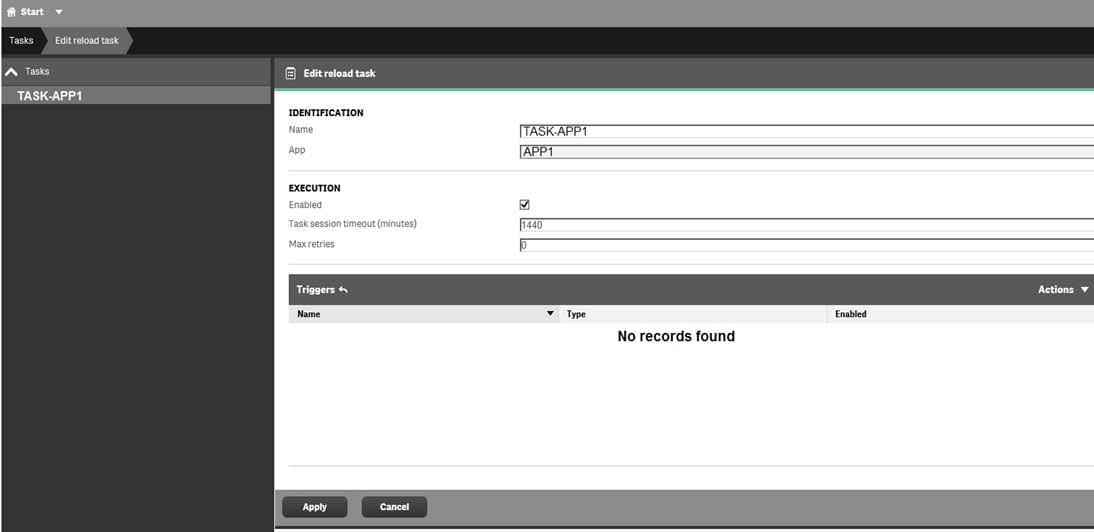
Refer to the exhibit.
What is the result when the administrator selects the Start button for TASK-APP1 in the Task screen?
A. A prompt will appear to create a trigger
B. TASK-APP1 will start but eventually fail
C. TASK-APP1 will run successfully
D. TASK-APP1 will run continuously
A user creates an app in Qlik Sense Desktop using a database as the data source. The user is able to connect to the database and reload the app with new data.
To share the app, the user emails the app QVF file to the system administrator. The administrator imports the app successfully and publishes the app to the Everyone stream in the hub. The administrator creates a task to reload the data in the app every 12 hours.
The next day, the user observes that the data has NOT been refreshed in the app. No modifications have been made to the access rights for the data source.
What is the likely cause of this issue?
A. A custom property limits which tables can be accessed from the database
B. The system administrator does NOT have permission to access the source database
C. An identically-named data connection with another data source existed prior to the import
D. A security rule prevents the data connection from loading data into the app