
Exam2pass
0 items Sign In or Register
  • Home
  • IT Exams
  • Guarantee
  • FAQs
  • Reviews
  • Contact Us
  • Demo
Exam2pass > CompTIA > CompTIA Certifications > XK0-005 > XK0-005 Online Practice Questions and Answers

XK0-005 Online Practice Questions and Answers

Questions 4

In which of the following filesystems are system logs commonly stored?

A. /var

B. /tmp

C. /etc

D. /opt

Buy Now

Correct Answer: A

Explanation: The filesystem that system logs are commonly stored in is /var. The /var filesystem is a directory that contains variable data files on Linux systems. Variable data files are files that are expected to grow in size over time, such as logs, caches, spools, and temporary files. The /var filesystem is separate from the / filesystem, which contains the essential system files, to prevent the / filesystem from being filled up by the variable data files. The system logs are files that record the events and activities of the system and its components, such as the kernel, the services, the applications, and the users. The system logs are useful for monitoring, troubleshooting, and auditing the system. The system logs are commonly stored in the /var/log directory, which is a subdirectory of the /var filesystem. The /var/log directory contains various log files, such as syslog, messages, dmesg, auth.log, and kern.log. The filesystem that system logs are commonly stored in is /var. This is the correct answer to the question. The other options are incorrect because they are not the filesystems that system logs are commonly stored in (/tmp, /etc, or /opt). References: CompTIA Linux+ (XK0-005) Certification Study Guide, Chapter 16: Managing Logging and Monitoring, page 487.

Questions 5

Following the migration from a disaster recovery site, a systems administrator wants a server to require a user to change credentials at initial login. Which of the following commands should be used to ensure the aging attribute?

A. chage -d 2 user

B. chage -d 0 user

C. chage -E 0 user

D. chage -d 1 user

Buy Now

Correct Answer: B

The chage command can be used to change the user password expiry information. The -d or --lastday option sets the last password change date. If the value is 0, the user will be forced to change the password at the next login. See chage command in Linux with examples and 10 chage command examples in Linux.

Questions 6

A Linux engineer has been notified about the possible deletion of logs from the file /opt/app/logs. The engineer needs to ensure the log file can only be written into without removing previous entries.
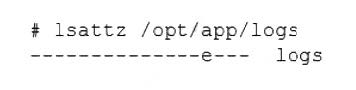
Which of the following commands would be BEST to use to accomplish this task?

A. chattr +a /opt/app/logs

B. chattr +d /opt/app/logs

C. chattr +i /opt/app/logs

D. chattr +c /opt/app/logs

Buy Now

Correct Answer: A

Explanation: The command chattr +a /opt/app/logs will ensure the log file can only be written into without removing previous entries. The chattr command is a tool for changing file attributes on Linux file systems. The +a option sets the append-only attribute, which means that the file can only be opened in append mode for writing. This prevents the file from being modified, deleted, or renamed. This is the best command to use to accomplish the task. The other options are incorrect because they either set the wrong attributes (+d, +i, or +c) or do not affect the file at all (-a). References: CompTIA Linux+ (XK0-005) Certification Study Guide, Chapter 11: Managing Files and Directories, page 357.

Questions 7

Due to low disk space, a Linux administrator finding and removing all log files that were modified more than 180 days ago. Which of the following commands will accomplish this task?

A. find /var/log -type d -mtime +180 -print -exec rm {} \;

B. find /var/log -type f -modified +180 -rm

C. find /var/log -type f -mtime +180 -exec rm {} \

D. find /var/log -type c -atime +180 璻emove

Buy Now

Correct Answer: C

Explanation: The command that will accomplish the task of finding and removing all log files that were modified more than 180 days ago is find /var/log -type f -mtime +180 -exec rm {} ;. This command will use find to search for files (-type f)

under /var/log directory that have a modification time (-mtime) older than 180 days (+180). For each matching file, it will execute (-exec) the rm command to delete it, passing the file name as an argument ({}). The command will end with a

semicolon (;), which is escaped with a backslash to prevent shell interpretation.

The other options are not correct commands for accomplishing the task. The find /var/log - type d -mtime +180 -print -exec rm {} ; command will search for directories (-type d) instead of files, and print their names (-print) before deleting them.

This is not what the task requires. The find /var/log -type f -modified +180 -rm command is invalid because there is no such option as -modified or -rm for find. The correct options are -mtime and -delete, respectively. The find /var/log -type c atime +180 璻emove command is also invalid because there is no such option as 璻emove for find. Moreover, it will search for character special files (-type c) instead of regular files, and use access time (-atime) instead of modification time.

References: find(1) - Linux manual page; Find and delete files older than n days in Linux

Questions 8

An administrator accidentally deleted the /boot/vmlinuz file and must resolve the issue before the server is rebooted. Which of the following commands should the administrator use to identify the correct version of this file?

A. rpm -qa | grep kernel; uname -a

B. yum -y update; shutdown -r now

C. cat /etc/centos-release; rpm -Uvh --nodeps

D. telinit 1; restorecon -Rv /boot

Buy Now

Correct Answer: A

Explanation: The command rpm -qa | grep kernel lists all the installed kernel packages, and the command uname -a displays the current kernel version. These commands can help the administrator identify the correct version of the /boot/

vmlinuz file, which is the kernel image file. The other options are not relevant or helpful for this task. References: CompTIA Linux+ (XK0-005) Certification Study Guide, Chapter 8:

Managing the Linux Boot Process, page 267.

Questions 9

Several users reported that they were unable to write data to the /oracle1 directory. The following output has been provided:

Which of the following commands should the administrator use to diagnose the issue?

A. df -i /oracle1

B. fdisk -1 /dev/sdb1

C. lsblk /dev/sdb1

D. du -sh /oracle1

Buy Now

Correct Answer: A

Explanation: The administrator should use the command df -i /oracle1 to diagnose the issue of users being unable to write data to the /oracle1 directory. This command will show the inode usage of the /oracle1 filesystem, which indicates how many files and directories can be created on it. If the inode usage is 100%, it means that no more files or directories can be added, even if there is still free space on the disk. The administrator can then delete some unnecessary files or directories, or increase the inode limit of the filesystem, to resolve the issue. The other options are not correct commands for diagnosing this issue. The fdisk -l /dev/sdb1 command will show the partition table of /dev/sdb1, which is not relevant to the inode usage. The lsblk /dev/sdb1 command will show information about /dev/sdb1 as a block device, such as its size, mount point, and type, but not its inode usage. The du -sh /oracle1 command will show the disk usage of /oracle1 in human-readable format, but not its inode usage. References: CompTIA Linux+ (XK0-005) Certification Study Guide, Chapter 7: Managing Disk Storage; How to Check Inode Usage in Linux - Fedingo

Questions 10

A Linux administrator is scheduling a system job that runs a script to check available disk space every hour. The Linux administrator does not want users to be able to start the job. Given the following:
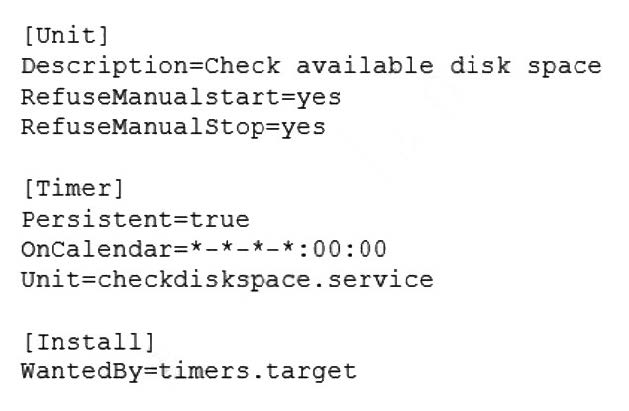
The Linux administrator attempts to start the timer service but receives the following error message:

Which of the following is MOST likely the reason the timer will not start?

A. The checkdiskspace.timer unit should be enabled via systemct1.

B. The timers.target should be reloaded to get the new configuration.

C. The checkdiskspace.timer should be configured to allow manual starts.

D. The checkdiskspace.timer should be started using the sudo command.

Buy Now

Correct Answer: C

Explanation: The most likely reason the timer will not start is that the checkdiskspace.timer should be configured to allow manual starts. By default, systemd timers do not allow manual activation via systemct1 start, unless they have RefuseManualStart=no in their [Unit] section. This option prevents users from accidentally starting timers that are meant to be controlled by other mechanisms, such as calendar events or dependencies. To enable manual starts for checkdiskspace.timer, the administrator should add RefuseManualStart=no to its [Unit] section and reload systemd. The other options are not correct reasons for the timer not starting. The checkdiskspace.timer unit does not need to be enabled via systemct1 enable, because enabling a timer only makes it start automatically at boot time or after a system reload, but does not affect manual activation. The timers.target does not need to be reloaded to get the new configuration, because reloading a target only affects units that have a dependency on it, but does not affect manual activation. The checkdiskspace.timer does not need to be started using the sudo command, because the administrator is already running systemct1 as root, as indicated by the # prompt. References: systemd.timer(5) - Linux manual page; systemct1(1) - Linux manual page

Questions 11

A user is unable to log on to a Linux workstation. The systems administrator executes the following command:

cat /etc/shadow | grep user1

The command results in the following output:

user1 :! $6$QERgAsdvojadv4asdvaarC/9dj34GdafGVaregmkdsfa:18875:0:99999:7 :::

Which of the following should the systems administrator execute to fix the issue?

A. chown -R userl:user1 /home/user1

B. sed -i '/ ::: / :: /g' /etc/shadow

C. chgrp user1:user1 /home/user1

D. passwd -u user1

Buy Now

Correct Answer: D

The output shows that the user1 account has a locked password, indicated by the exclamation point (!) in the second field of the /etc/shadow file1. To unlock the password and allow the user to log in, the systems administrator should use the passwd command with the -u (unlock) option2. References: 1: Understanding the /etc/shadow File 2: How To Use The Passwd Command In Linux

Questions 12

A Linux administrator has logged in to a server for the first time and needs to know which services are allowed through the firewall. Which of the following options will return the results for which the administrator is looking?

A. firewall-cmd --get-services

B. firewall-cmd --check-config

C. firewall-cmd --list-services

D. systemct1 status firewalld

Buy Now

Correct Answer: C

Explanation: The firewall-cmd --list-services command will return the results for which the administrator is looking. This command will list all services that are allowed through the firewall in the default zone or a specified zone. A service is a predefined set of ports and protocols that can be enabled or disabled by firewalld. The firewall-cmd --get-services command will list all available services that are supported by firewalld, not only those that are allowed through the firewall. The firewall-cmd --check-config command will check if firewalld configuration files are valid, not list services. The systemct1 status firewalld command will display information about the firewalld service unit, such as its state, PID, memory usage, and logs, not list services. References: CompTIA Linux+ (XK0-005) Certification Study Guide, Chapter 18: Securing Linux Systems, page 543.

Questions 13

A Linux engineer is setting the sticky bit on a directory called devops with 755 file permission. Which of the following commands will accomplish this task?

A. chown -s 755 devops

B. chown 1755 devops

C. chmod -s 755 devops

D. chmod 1755 devops

Buy Now

Correct Answer: D

Explanation: The command that will set the sticky bit on a directory called devops with 755 file permission is chmod 1755 devops. This command will use chmod to change the mode of the directory devops to 1755, which means that the owner has read, write, and execute permissions (7), the group has read and execute permissions (5), and others have read and execute permissions (5). The first digit 1 indicates that the sticky bit is set on the directory, which is a special permission that prevents users from deleting or renaming files in the directory that they do not own. The other options are not correct commands for setting the sticky bit on a directory. The chown -s 755 devops command is invalid because chown is used to change the owner and group of files or directories, not their permissions. The -s option for chown is used to remove a symbolic link, not to set the sticky bit. The chown 1755 devops command is also invalid because chown does not accept numeric arguments for changing permissions. The chmod -s 755 devops command will remove the sticky bit from the directory devops, not set it. References: chmod(1) - Linux manual page; How to Use SUID, SGID, and Sticky Bits on Linux

Exam Code: XK0-005
Exam Name: CompTIA Linux+
Last Update: May 27, 2026
Questions: 476

PDF (Q&A)

$45.99
ADD TO CART

VCE

$49.99
ADD TO CART

PDF + VCE

$59.99
ADD TO CART

Exam2Pass----The Most Reliable Exam Preparation Assistance

There are tens of thousands of certification exam dumps provided on the internet. And how to choose the most reliable one among them is the first problem one certification candidate should face. Exam2Pass provide a shot cut to pass the exam and get the certification. If you need help on any questions or any Exam2Pass exam PDF and VCE simulators, customer support team is ready to help at any time when required.

Home | Guarantee & Policy |  Privacy & Policy |  Terms & Conditions |  How to buy |  FAQs |  About Us |  Contact Us |  Demo |  Reviews

2026 Copyright @ exam2pass.com All trademarks are the property of their respective vendors. We are not associated with any of them.