

 Printable PDF
VMware 5V0-41.20 Exam Questions & Answers
Want to pass your VMware 5V0-41.20 exam in the very first attempt? Try Exam2pass! It is equally effective for both starters and IT professionals.
-
Vendor: VMware
Exam Code: 5V0-41.20
Exam Name: VMware SD-WAN Troubleshoot
Certification Provider: VMware
Total Questions: 36 Q&A ( View Details)
Updated on: Jul 03, 2026
Note: Product instant download. Please sign in and click My account to download your product. -
- Updated exam questions with all objectives covered
- Verified answers
- 365 days free updates
- 99% success rate
- 100% money back guarantee
- 24/7 customer support



Related Exams
- 1V0-21.20 Associate VMware Data Center Virtualization
- 1V0-31.21 Associate VMware Cloud Management and Automation
- 1V0-41.20 Associate VMware Network Virtualization
- 1V0-61.21 Associate VMware Digital Workspace
- 1V0-71.21 Associate VMware Application Modernization
- 1V0-81.20 Associate VMware Security
- 2V0-11.24 VMware Cloud Foundation 5.2 Administrator
- 2V0-11.25 VMware Cloud Foundation 5.2 Administrator
- 2V0-13.24 VMware Cloud Foundation 5.2 Architect
- 2V0-13.25 VMware Cloud Foundation 9.0 Architect
- 2V0-15.25 VMware Certified Professional - VMware Cloud Foundation 9.0 Support
- 2V0-16.25 VMware vSphere Foundation 9.0 Administrator
- 2V0-17.25 VMware Cloud Foundation 9.0 Administrator
- 2V0-21.20 Professional VMware vSphere 7.x
- 2V0-21.23 VMware vSphere 8.x Professional
- 2V0-31.21 Professional VMware vRealize Automation 8.3
- 2V0-31.23 VMware Aria Automation 8.10 Professional
- 2V0-31.24 VMware Aria Automation 8.10 Professional V2
- 2V0-32.24 VMware Cloud Operations 8.x Professional V2
- 2V0-33.22 VMware Cloud Professional
- 2V0-41.23 VMware NSX 4.x Professional
- 2V0-41.24 VMware NSX 4.x Professional V2
- 2V0-51.23 VMware Horizon 8.x Professional
- 2V0-62.21 Professional VMware Workspace ONE 21.X
- 2V0-62.23 VMware Workspace ONE 22.X Professional
- 2V0-71.23 VMware Tanzu for Kubernetes Operations Professional
- 2V0-72.22 Professional Develop VMware Spring
- 3V0-21.21 Advanced Design VMware vSphere 7.x
- 3V0-21.23 VMware vSphere 8.x Advanced Design
- 3V0-21.25 Advanced VMware Cloud Foundation 9.0 Automation
5V0-41.20 Online Practice Questions and Answers
Scenario 1:
A network administrator is tasked! with enabling SO-WAN at three branch locations. A topology has been provided for reference. For each site, the administrator is having issues bringing edges online, as another administrator has gone ahead and created a configuration ahead of time. The organization has several branch sites- One is an Internet- only site and two are Hybrid locations with both internet and MPLS: The last location is MPLS only. There are hub data center locations in this environment as well. Please refer to the topology.
Exhibit.

An administrator is attempting to activate two Edge devices at the Chicago branch location. The local technician reports that the Edge devices are not coming online. The Edge devices have been plugged in, powered on, and connected to the correct circuits with an Enhanced HA setup.
What should the local technician check first when troubleshooting the issue?
A. Verify beep sequence of the Edge devices.
B. Review color of the LED.
C. Review the Orchestrator for HA misconfiguration issues.
D. Verify the link light sequence of the HA ports.
Scenario 3:
After resolving numerous connectivity issues throughout the various branch sites, connectivity between applications and users is finally present. The network administrator is informed that during certain tests, applications are not performing as they are expected to. Users report that call quality has not fully improved and that some of their calls either drop or have poor voice quality where the conversation is breaking up. Other users are noticing that file transfers are slower than expect. A group of users from a few sites have reported slowness in accessing internal and external applications.
Exhibit.

A network administrator decides to deploy a local Checkpoint VNF appliance on the Edge in London to cut back on unnecessary traffic towards the NY hub location.
The Checkpoint VNF and associated security services were successfully deployed at the London Branch. Users are now are complaining that Webpages are extremely slow to load, just like before.
What should the administrator do?
A. Reboot the Edge, as this is a requirement in the deployment of a Security VNF.
B. Disable and redeploy the VNF with lower memory requirements.
C. Verify to see if a firewall rule in the Edge is set to allow traffic to the Checkpoint VNF.
D. Check the flow records in Remote Diagnostics.
Scenario 3:
After completing the branch activation activities for all required branches, the network administrator attempts to test connectivity between the various branches and between the hubs and branches. The administrator notices a lack of connectivity despite being certain that configurations have been complete. The administrator also observed that several users are reporting intermittent connectivity to some of the applications they are accessing. Other users are reporting no access to these applications. Other users at some of the branches claim they cannot get to certain public resources. The administrator wants to ensure that all sites can talk to each other and all resources are accessible.
Exhibit.
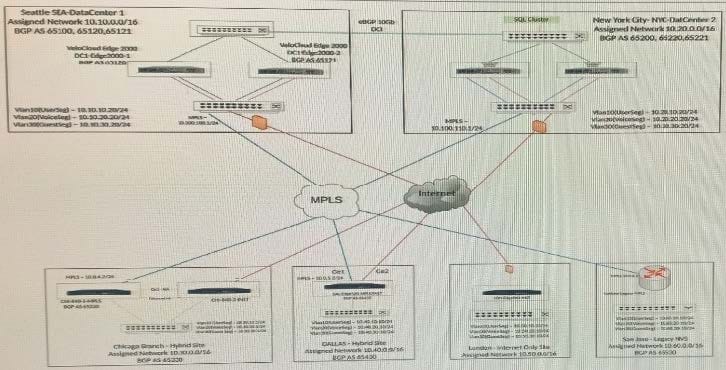
The network administrator determines that dynamic routes to SD-WAN sites are missing at the San Jose branch router. The network administrator decides to look into the configurations of hub Edges. All SD-WAN branch sites must use a hub to communicate with the San Jose site. Best practices have been implemented at these SD-WAN sites.
Where should the administrator check first to verify if the configuration is correct?
A. Verify that the NVS feature is enabled in Cloud VPN.
B. Verify that redistribution between the primary hub site and San Jose is enabled.
C. Verify the static routes to San Jose from all Branches are configured.
D. Verify that redistribution at the Dallas Hybrid Site is enabled for San Jose to use as a peering point.
Why Choose Exam2pass 5V0-41.20 Exam PDF and VCE Simulator?
-
100% Pass and Money Back Guarantee
Exam2pass 5V0-41.20 exam dumps are contained with latest 5V0-41.20 real exam questions and answers. Exam2pass 5V0-41.20 PDF and VCE simulator are revised by the most professional 5V0-41.20 expert team. All the 5V0-41.20 exam questions are selected from the latest real exam and answers are revised to be accurate. 100% pass guarantee and money back on exam failure.
-
The Most Professional Support Service
Exam2pass has the most skillful 5V0-41.20 experts. Candidates can get timely help when needed. Exam2pass 5V0-41.20 exam PDF and VCE simulator are the most up-to-date and valid. The most professional support service are provided to help the 5V0-41.20 candidates at anytime and anywhere.
-
365 Days Free Update Download
Exam2pass 5V0-41.20 exam PDF and VCE simulator are timely updated in 365 days a year. Users can download the update for free for 365 days after payment. Exam2pass 5V0-41.20 exam dumps are updated frequently by the most professional 5V0-41.20 expert team. 5V0-41.20 candidates can have the most valid 5V0-41.20 exam PDF and VCE at any time when needed.
-
Free Demo Download
Download free demo of the Exam2pass exam PDF and VCE simulator and try it. Do not need to pay for the whole product before you try the free trial version. Get familiar about the exam questions and exam structure by trying the free sample questions of the exam PDF and VCE simulator. Try before purchase now!