
 Printable PDF
Microsoft 77-427 Exam Questions & Answers
Want to pass your Microsoft 77-427 exam in the very first attempt? Try Exam2pass! It is equally effective for both starters and IT professionals.
-
Vendor: Microsoft
Exam Code: 77-427
Exam Name: Excel 2013 Expert Part One
Certification Provider: Microsoft
Total Questions: 62 Q&A
Updated on: Jul 13, 2026
Note: Product instant download. Please sign in and click My account to download your product. -
- Updated exam questions with all objectives covered
- Verified answers
- 365 days free updates
- 99% success rate
- 100% money back guarantee
- 24/7 customer support



Related Exams
- 62-193 Technology Literacy for Educators
- 70-243 Administering and Deploying System Center 2012 Configuration Manager
- 70-355 Universal Windows Platform – App Data, Services, and Coding Patterns
- 77-420 Excel 2013
- 77-427 Excel 2013 Expert Part One
- 77-725 Word 2016 Core Document Creation, Collaboration and Communication
- 77-726 Word 2016 Expert Creating Documents for Effective Communication
- 77-727 Excel 2016 Core Data Analysis, Manipulation, and Presentation
- 77-728 Excel 2016 Expert: Interpreting Data for Insights
- 77-731 Outlook 2016 Core Communication, Collaboration and Email Skills
- 77-882 Excel 2010
- 77-886 SharePoint 2010
- 77-888 Excel 2010 Expert
- 98-349 Windows Operating System Fundamentals
- 98-361 Software Development Fundamentals
- 98-364 Database Fundamentals
- 98-365 Windows Server Administration Fundamentals
- 98-366 Networking Fundamentals
- 98-367 Security Fundamentals
- 98-368 Mobility and Devices Fundamentals
- 98-375 HTML5 Application Development Fundamentals
- 98-381 Introduction to Programming Using Python
- 98-382 Introduction to Programming Using JavaScript
- 98-383 Introduction to Programming Using HTML and CSS
- 98-388 Introduction to Programming Using Java
- AB-100 Agentic AI Business Solutions Architect
- AB-730 AI Business Professional
- AB-731 AI Transformation Leader
- AB-900 Microsoft 365 Copilot and Agent Administration Fundamentals
- AI-102 Designing and Implementing a Microsoft Azure AI Solution
Related Certifications
- Dynamics C5
- Dynamics-POS-2009
- MCITP
- MCSE
- MCTS
- Microsoft Business I...
- Microsoft Business S...
- Microsoft Certificat...
- Microsoft Certified ...
- Microsoft Dynamics
- Microsoft Dynamics 3...
- Microsoft Dynamics A...
- Microsoft Dynamics A...
- Microsoft Dynamics C...
- Microsoft Dynamics C...
- Microsoft Dynamics C...
- Microsoft Dynamics G...
- Microsoft Dynamics N...
- Microsoft Dynamics S...
- Microsoft other Cert...
77-427 Online Practice Questions and Answers
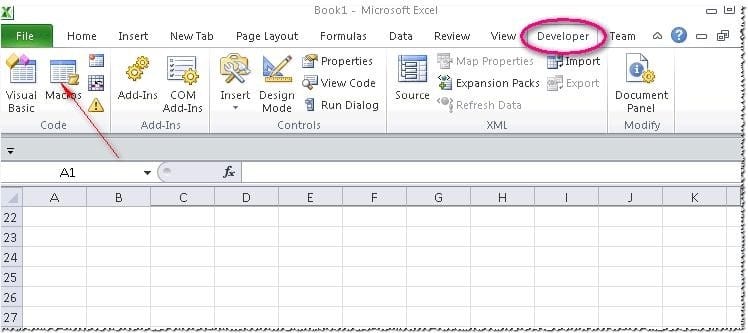
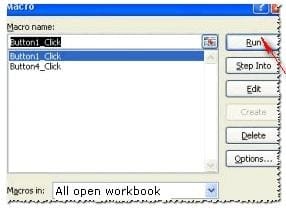
Rick works as an Office Assistant for Tech Perfect Inc. He is creating a user form through Microsoft Excel 2013. While creating forms for a number of users, he is required to repeat some of the actions multiple times. It is a very time consuming process. To resolve the issue, he has created a macro to record the sequence of actions to perform a certain task. Now, he wants to run the macro to play those exact actions back in the same order. Which of the following steps will Rick take to accomplish the task?
Each correct answer represents a part of the solution. Choose all that apply.
A. Click on the 'Macros' icon in the 'Developer' tab under the 'Code' category to run a Macro.
B. The Macro will be run in any worksheet of the Workbook.
C. Put the workbook in a trusted location.
D. The Macro dialogue box appears on the screen which contains a list of Macros in it. Select the Macro to run and click the Run button.
E. Run the created Macro by using the shortcut key specified while creating the Macro.
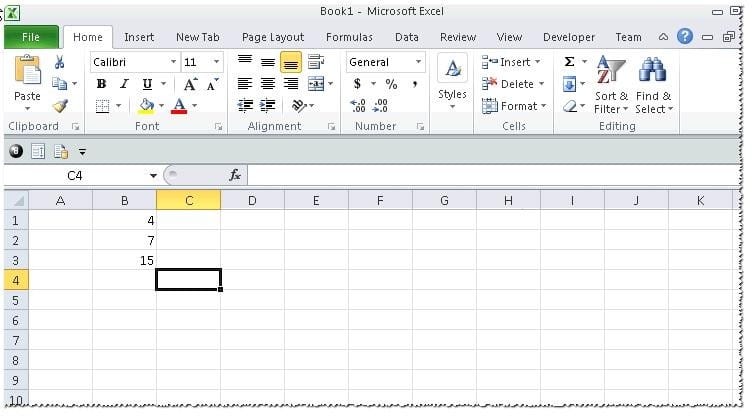
You work as an Office Assistant for Tech Perfect Inc. You are working in a spreadsheet as shown below:
You want to use Excel Transpose Function for copying the contents of cells B1:B3 into cells A5:C5.
You simply type '=TRANSPOSE( B1:B3 )' into the cells A5:C5. It displays the Excel #VALUE! error message because the cells are working independently and the function will not work for each individual cell. Therefore, it is required to make the cells A5:C5 work together as an ARRAY. For this purpose, you are required to use an array formula. Which of the following steps will you take to input Excel array formulas in the spreadsheet?
Each correct answer represents a part of the solution. Choose all that apply.
A. Type the array formula into the first cell.
B. Highlight the range of cells that you want to use as an input in his array formula.
C. Press CTRL-SHIFT-Tab to remove the error message.
D. Press CTRL-SHIFT-Enter.
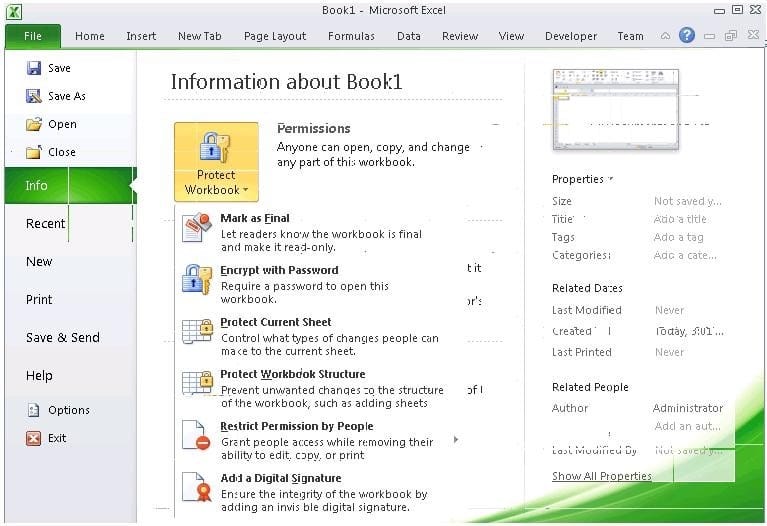
You work as an Office Assistant for Media Perfect Inc. You have created a spreadsheet in Excel 2013 and shared it with the other employees of the company. You select the Encrypt with Password option as a protection measure for the document you are sharing. Now, you have to specify a password in the Password box in the Encrypt Document dialog box appeared for editing the document. But you have forgotten the password. What will happen in this situation?
A. You will use a new password.
B. You will ask Microsoft to retrieve the password.
C. You will fetch the password from the list in which you have saved it.
D. You will create a new document.
Why Choose Exam2pass 77-427 Exam PDF and VCE Simulator?
-
100% Pass and Money Back Guarantee
Exam2pass 77-427 exam dumps are contained with latest 77-427 real exam questions and answers. Exam2pass 77-427 PDF and VCE simulator are revised by the most professional 77-427 expert team. All the 77-427 exam questions are selected from the latest real exam and answers are revised to be accurate. 100% pass guarantee and money back on exam failure.
-
The Most Professional Support Service
Exam2pass has the most skillful 77-427 experts. Candidates can get timely help when needed. Exam2pass 77-427 exam PDF and VCE simulator are the most up-to-date and valid. The most professional support service are provided to help the 77-427 candidates at anytime and anywhere.
-
365 Days Free Update Download
Exam2pass 77-427 exam PDF and VCE simulator are timely updated in 365 days a year. Users can download the update for free for 365 days after payment. Exam2pass 77-427 exam dumps are updated frequently by the most professional 77-427 expert team. 77-427 candidates can have the most valid 77-427 exam PDF and VCE at any time when needed.
-
Free Demo Download
Download free demo of the Exam2pass exam PDF and VCE simulator and try it. Do not need to pay for the whole product before you try the free trial version. Get familiar about the exam questions and exam structure by trying the free sample questions of the exam PDF and VCE simulator. Try before purchase now!