

Exam2pass
0 items Sign In or Register
  • Home
  • IT Exams
  • Guarantee
  • FAQs
  • Reviews
  • Contact Us
  • Demo
Home > Nutanix > Nutanix Certifications > NCM-MCI-6.5
Nutanix NCM-MCI-6.5  Exam Questions & Answers
Download Demo

  Printable PDF

Nutanix NCM-MCI-6.5 Exam Questions & Answers


Want to pass your Nutanix NCM-MCI-6.5 exam in the very first attempt? Try Exam2pass! It is equally effective for both starters and IT professionals.

  • Vendor: Nutanix

    Exam Code: NCM-MCI-6.5

    Exam Name: Nutanix Certified Master - Multicloud Infrastructure (NCM-MCI) v6.5

    Certification Provider: Nutanix

    Total Questions: 16 Q&A

    Updated on: Jul 07, 2026

    Note: Product instant download. Please sign in and click My account to download your product.
  • PDF Only: $45.99
    Phone Mac Windows
    Software Only: $49.99
    Windows
    Software + PDF: $59.99

  • Updated exam questions with all objectives covered
    Verified answers
    365 days free updates
    99% success rate
    100% money back guarantee
    24/7 customer support

Related Exams

  • NCA-5.15 Nutanix Certified Associate (NCA) v5.15
  • NCA-5.20 Nutanix Certified Associate (NCA) v5.20
  • NCA-6.10 Nutanix Certified Associate NCA v6.10
  • NCA-6.5 Nutanix Certified Associate (NCA) v6.5
  • NCM-5.15 Nutanix Certified Master - Multicloud Infrastructure (NCM-MCI) v5.15
  • NCM-MCI Nutanix Certified Master - Multicloud Infrastructure
  • NCM-MCI-5.15 Nutanix Certified Master - Multicloud Infrastructure (NCM-MCI) v5.15
  • NCM-MCI-5.20 Nutanix Certified Master - Multicloud Infrastructure (NCM-MCI) v5.20
  • NCM-MCI-6.5 Nutanix Certified Master - Multicloud Infrastructure (NCM-MCI) v6.5
  • NCP-5.10 Nutanix Certified Professional (NCP) v5.10
  • NCP-5.15 Nutanix Certified Professional - Multi cloud Infrastructure (NCP-MCI) v5.15
  • NCP-AI Nutanix Certified Professional - Artificial Intelligence (NCP-AI 6.10)
  • NCP-BC-7.5 Nutanix Certified Professional - Business Continuity (NCP-BC) 7.5
  • NCP-CN-6.10 Nutanix Certified Professional - Cloud Native (NCP-CN-6.10)
  • NCP-DS Nutanix Certified Professional - Data Services
  • NCP-MCI-5.20 Nutanix Certified Professional - Multi cloud Infrastructure (NCP) v5.20
  • NCP-MCI-6.10 Nutanix Certified Professional - Multicloud Infrastructure (NCP-MCI v6.10)
  • NCP-MCI-6.5 Nutanix Certified Professional - Multicloud Infrastructure (NCP-MCI) v6.5
  • NCP-MCI-7.5 Nutanix Certified Professional - Multicloud Infrastructure (NCP-MCI) 7.5
  • NCP-NS-7.5 Nutanix Certified Professional - Network and Security (NCP-NS) 7.5
  • NCP-US Nutanix Certified Professional - Unified Storage (NCP-US) v6
  • NCP-US-6.10 Nutanix Certified Professional - Unified Storage (NCP-US) v6.10
  • NCP-US-6.5 Nutanix Certified Professional - Unified Storage (NCP-US) v6.5
  • NCS-CORE Nutanix Certified Services Core Infrastructure Professional
  • NCSC-LEVEL-1 Nutanix Certified Services Consultant (NCSC): Level 1
  • NCSE-CORE Nutanix Certified Systems Engineer Core
  • NCSE-LEVEL-1 Nutanix Certified Systems Engineer (NCSE): Level 1
  • NCSR-LEVEL-1 Nutanix Certified Sales Representative (NCSR): Level 1
  • NCSR-LEVEL-2 Nutanix Certified Sales Representative (NCSR): Level 2
  • NCSR-LEVEL-3 Nutanix Certified Sales Representative (NCSR): Level 3

Related Certifications

  • Nutanix Certificatio...
  • Nutanix Platform Exp...

NCM-MCI-6.5 Online Practice Questions and Answers

Questions 1

CORRECT TEXT

Task 7

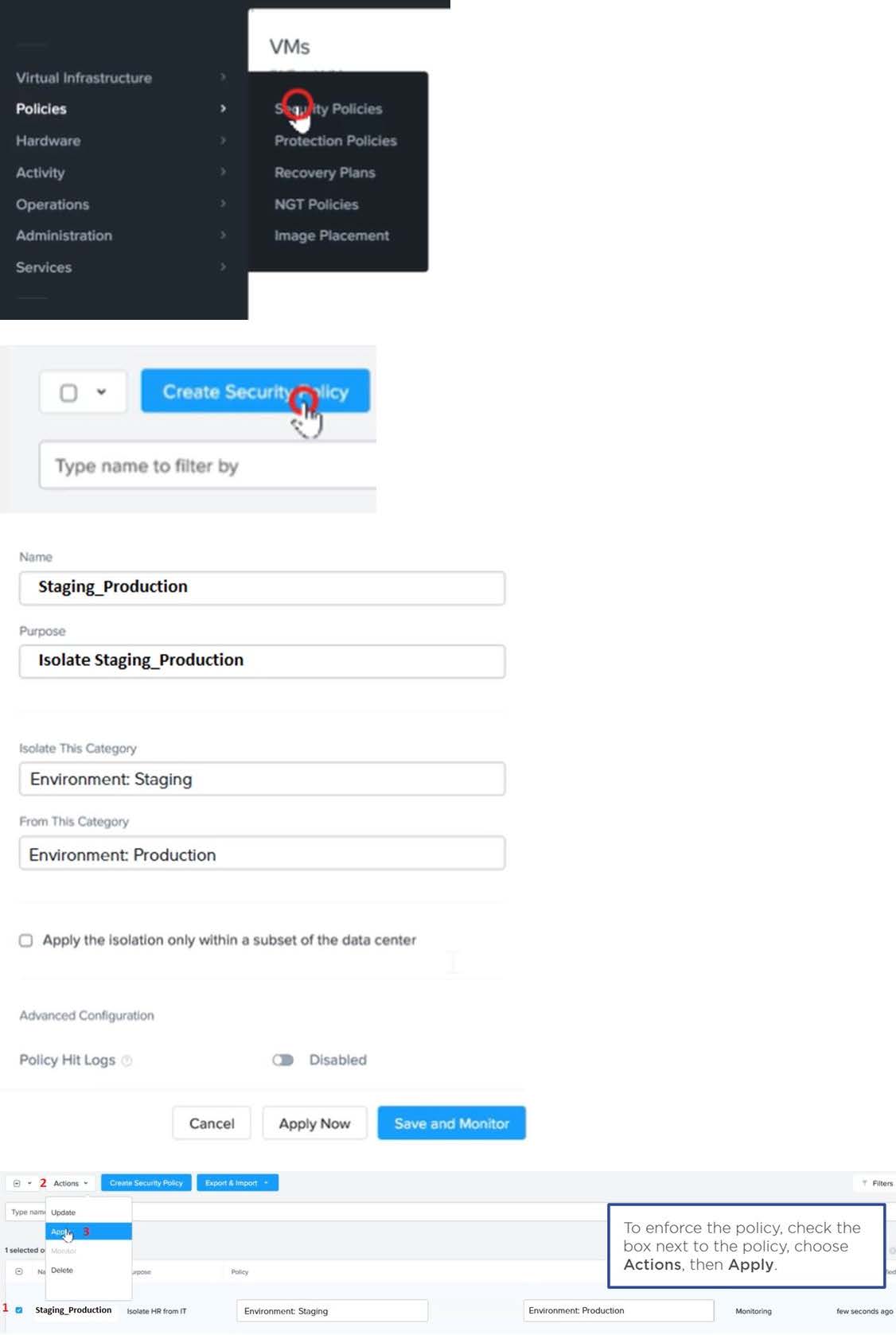
An administrator has environment that will soon be upgraded to 6.5. In the meantime, they need to implement log and apply a security policy named Staging_Production, such that not VM in the Staging Environment can communicate with any

VM in the production Environment,

Configure the environment to satisfy this requirement.

Note: All other configurations not indicated must be left at their default values.

A. Answer: See the for step by step solution.
Show Answer

Correct Answer: A

To configure the environment to satisfy the requirement of implementing a security policy named Staging_Production, such that no VM in the Staging Environment can communicate with any VM in the production Environment, you need to do the following steps: Log in to Prism Central and go to Network > Security Policies > Create Security Policy. Enter Staging_Production as the name of the security policy and select Cluster A as the cluster. In the Scope section, select VMs as the entity type and add the VMs that belong to the Staging Environment and the Production Environment as the entities. You can use tags or categories to filter the VMs based on their environment. In the Rules section, create a new rule with the following settings: Direction: Bidirectional Protocol: Any Source: Staging Environment Destination: Production Environment Action: Deny Save the security policy and apply it to the cluster. This will create a security policy that will block any traffic between the VMs in the Staging Environment and the VMs in the Production Environment. You can verify that the security policy is working by trying to ping or access any VM in the Production Environment from any VM in the Staging Environment, or vice versa. You should not be able to do so.

Questions 2

CORRECT TEXT

Task 8

Depending on the order you perform the exam items, the access information and credentials could change. Please refer to the other item performed on Cluster B if you have problems accessing the cluster.

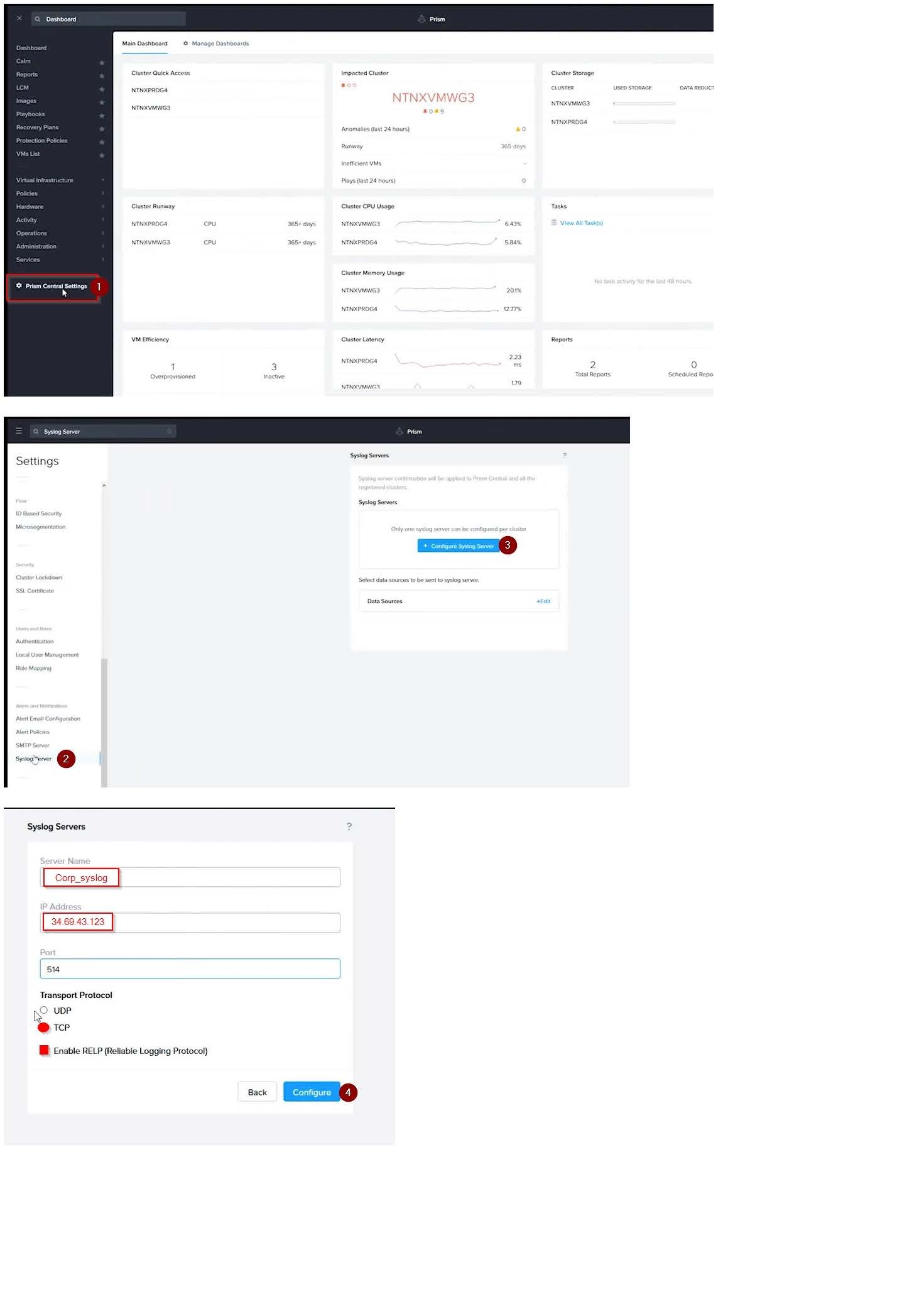
The infosec team has requested that audit logs for API Requests and replication capabilities be enabled for all clusters for the top 4 severity levels and pushed to their syslog system using highest reliability possible. They have requested no other logs to be included.

Syslog configuration:

Syslog Name: Corp_syslog

Syslop IP: 34.69.43.123

Port: 514

Ensure the cluster is configured to meet these requirements.

A. Answer: See the for step by step solution.
Show Answer

Correct Answer: A

To configure the cluster to meet the requirements of the infosec team, you need to do the following steps:

Log in to Prism Central and go to Network > Syslog Servers > Configure Syslog Server. Enter Corp_syslog as the Server Name, 34.69.43.123 as the IP Address, and 514 as the Port. Select TCP as the Transport Protocol and enable RELP

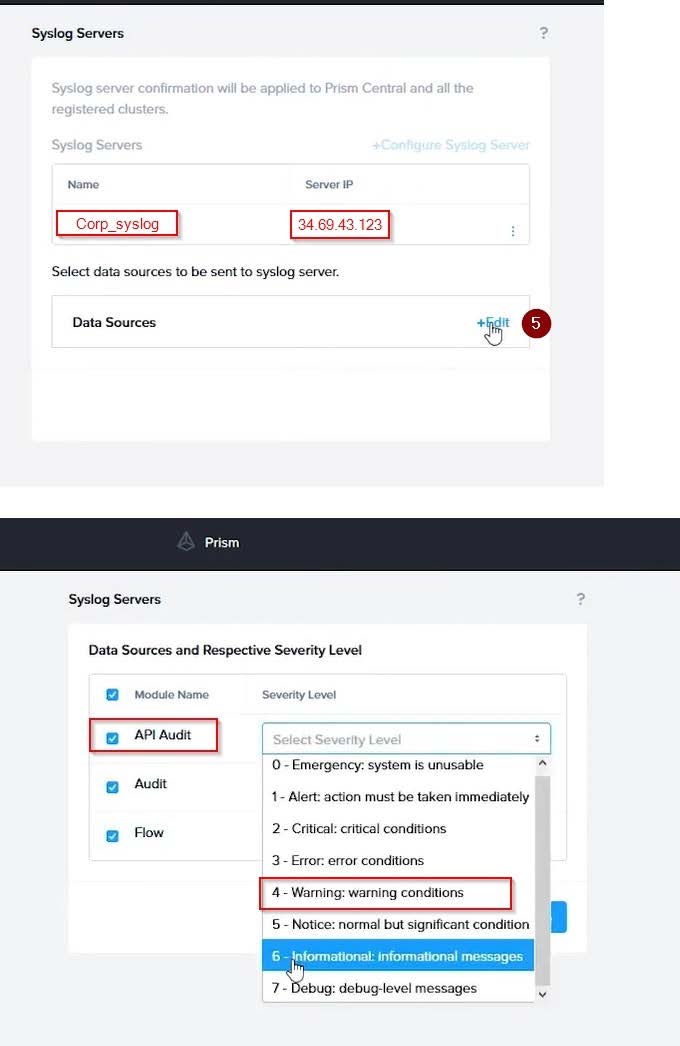
(Reliable Logging Protocol). This will create a syslog server with the highest reliability possible. Click Edit against Data Sources and select Cluster B as the cluster. Select API Requests and Replication as the data sources and set the log level

to CRITICAL for both of them. This will enable audit logs for API requests and replication capabilities for the top 4 severity levels (EMERGENCY, ALERT, CRITICAL, and ERROR) and push them to the syslog server. Click Save.

Repeat step 2 for any other clusters that you want to configure with the same requirements.

To configure the Nutanix clusters to enable audit logs for API Requests and replication capabilities, and push them to the syslog system with the highest reliability possible, you can follow these steps:

Log in to the Nutanix Prism web console using your administrator credentials. Navigate to the "Settings" section or the configuration settings interface within Prism. Locate the "Syslog Configuration" or "Logging" option and click on it.

Configure the syslog settings as follows:

Syslog Name: Enter "Corp_syslog" as the name for the syslog configuration. Syslog IP: Set the IP address to "34.69.43.123", which is the IP address of the syslog system.

Port: Set the port to "514", which is the default port for syslog. Enable the option for highest reliability or persistent logging, if available. This ensures that logs are sent reliably and not lost in case of network interruptions.

Save the syslog configuration.

Enable Audit Logs for API Requests:

In the Nutanix Prism web console, navigate to the "Cluster" section or the cluster management interface.

Select the desired cluster where you want to enable audit logs. Locate the "Audit Configuration" or "Security Configuration" option and click on it. Look for the settings related to audit logs and API requests. Enable the audit logging feature and

select the top 4 severity levels to be logged.

Save the audit configuration.

Enable Audit Logs for Replication Capabilities:

In the Nutanix Prism web console, navigate to the "Cluster" section or the cluster management interface.

Select the desired cluster where you want to enable audit logs. Locate the "Audit Configuration" or "Security Configuration" option and click on it. Look for the settings related to audit logs and replication capabilities. Enable the audit logging

feature and select the top 4 severity levels to be logged.

Save the audit configuration.

After completing these steps, the Nutanix clusters will be configured to enable audit logs for API Requests and replication capabilities. The logs will be sent to the specified syslog system with the highest reliability possible.

ncli

rsyslog-config set-status enable=false

rsyslog-config add-server name=Corp_Syslog ip-address=34.69.43.123 port=514 network-protocol=tdp relp-enabled=false

rsyslog-config add-module server-name= Corp_Syslog module-name=APLOS level=INFO

rsyslog-config add-module server-name= Corp_Syslog module-name=CEREBRO level=INFO

rsyslog-config set-status enable=true

https://portal.nutanix.com/page/documents/kbs/details?targetId=kA00e0000009CEECA2

Questions 3

CORRECT TEXT

Task 15

An administrator found a CentOS VM, Cent_Down, on the cluster with a corrupted network stack. To correct the issue, the VM will need to be restored from a previous snapshot to become reachable on the network again.

VM credentials:

Username: root

Password: nutanix/4u

Restore the VM and ensure it is reachable on the network by pinging 172.31.0.1 from the VM.

Power off the VM before proceeding.

A. Answer: See the for step by step solution.
Show Answer More Questions

Correct Answer: A

To restore the VM and ensure it is reachable on the network, you can follow these steps:

Log in to the Web Console of the cluster where the VM is running. Click on Virtual Machines on the left menu and find Cent_Down from the list. Click on the power icon to power off the VM.

Click on the snapshot icon next to the power icon to open the Snapshot Management window.

Select a snapshot from the list that was taken before the network stack was corrupted. You can use the date and time information to choose a suitable snapshot. Click on Restore VM and confirm the action in the dialog box. Wait for the

restore process to complete.

Click on the power icon again to power on the VM. Log in to the VM using SSH or console with the username and password provided. Run the command ping 172.31.0.1 to verify that the VM is reachable on the network. You should see a

reply from the destination IP address.

Go to VMS from the prism central gui

Select the VMand go to More -> Guest Shutdown

Go to Snapshots tab and revert to latest snapshot available power on vm and verify if ping is working

Why Choose Exam2pass NCM-MCI-6.5 Exam PDF and VCE Simulator?

  • 100% Pass and Money Back Guarantee

    Exam2pass NCM-MCI-6.5 exam dumps are contained with latest NCM-MCI-6.5 real exam questions and answers. Exam2pass NCM-MCI-6.5 PDF and VCE simulator are revised by the most professional NCM-MCI-6.5 expert team. All the NCM-MCI-6.5 exam questions are selected from the latest real exam and answers are revised to be accurate. 100% pass guarantee and money back on exam failure.

  • The Most Professional Support Service

    Exam2pass has the most skillful NCM-MCI-6.5 experts. Candidates can get timely help when needed. Exam2pass NCM-MCI-6.5 exam PDF and VCE simulator are the most up-to-date and valid. The most professional support service are provided to help the NCM-MCI-6.5 candidates at anytime and anywhere.

  • 365 Days Free Update Download

    Exam2pass NCM-MCI-6.5 exam PDF and VCE simulator are timely updated in 365 days a year. Users can download the update for free for 365 days after payment. Exam2pass NCM-MCI-6.5 exam dumps are updated frequently by the most professional NCM-MCI-6.5 expert team. NCM-MCI-6.5 candidates can have the most valid NCM-MCI-6.5 exam PDF and VCE at any time when needed.

  • Free Demo Download

    Download free demo of the Exam2pass exam PDF and VCE simulator and try it. Do not need to pay for the whole product before you try the free trial version. Get familiar about the exam questions and exam structure by trying the free sample questions of the exam PDF and VCE simulator. Try before purchase now!

Exam2Pass----The Most Reliable Exam Preparation Assistance

There are tens of thousands of certification exam dumps provided on the internet. And how to choose the most reliable one among them is the first problem one certification candidate should face. Exam2Pass provide a shot cut to pass the exam and get the certification. If you need help on any questions or any Exam2Pass exam PDF and VCE simulators, customer support team is ready to help at any time when required.

Home | Guarantee & Policy |  Privacy & Policy |  Terms & Conditions |  How to buy |  FAQs |  About Us |  Contact Us |  Demo |  Reviews

2026 Copyright @ exam2pass.com All trademarks are the property of their respective vendors. We are not associated with any of them.